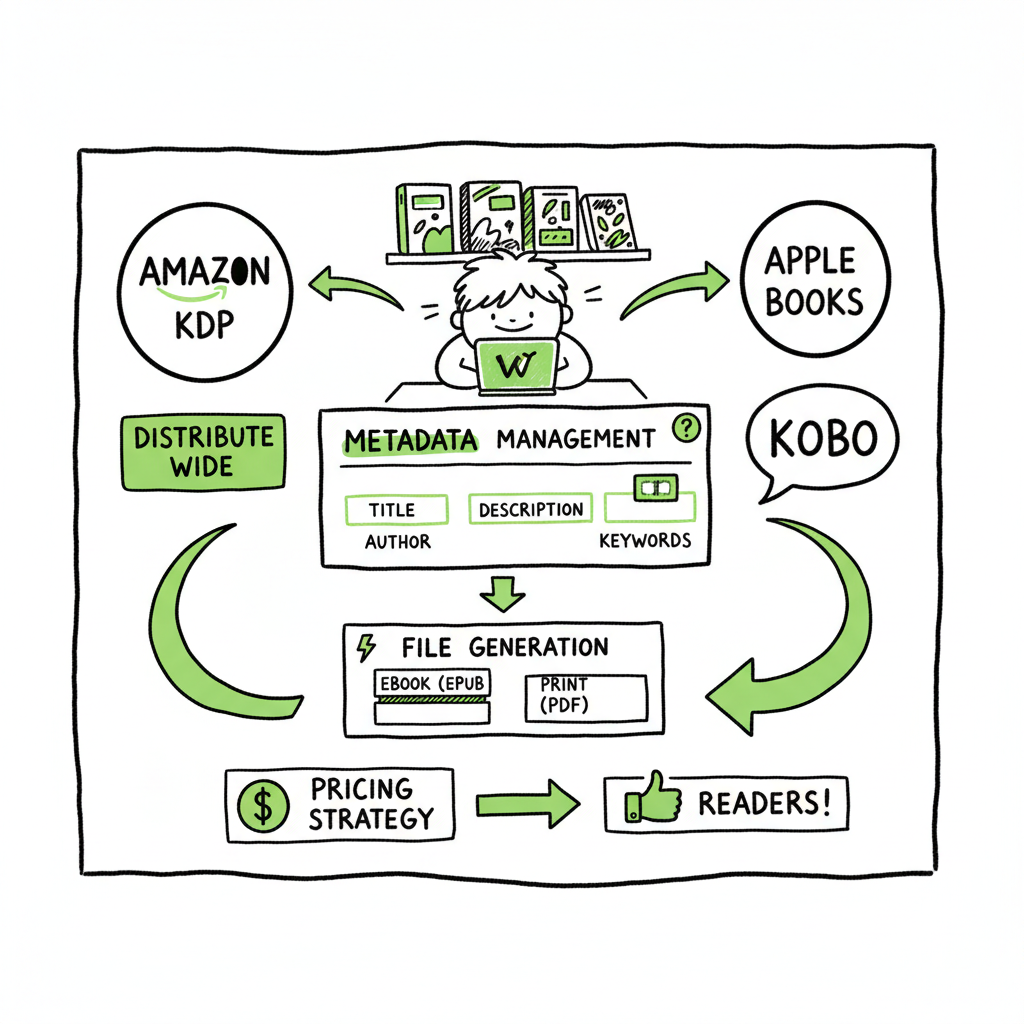
How to Self Publish on Multiple Platforms Step by Step
How to self publish on multiple platforms: a practical workflow for going wide
Estimated reading time: 9 minutes
Key takeaways
- Going wide gives you real reach beyond Amazon, but it needs repeatable file, metadata, and pricing discipline.
- Prepare a single clean source, generate platform-specific files (EPUB, print-ready PDF), and use batch tools to save time and avoid errors.
- Automation and a multi-platform uploader make wide distribution practical at scale — an obvious upgrade once authors publish seriously.
Table of Contents
- Why self publish on multiple platforms
- Prepare your files, metadata, and assets
- Upload, distribute, and pricing strategy
- Scale publishing with automation
- FAQ
Why self publish on multiple platforms
If you want readers in more places than Amazon alone, the phrase to remember is self publish on multiple platforms. Going wide—publishing to Apple Books, Kobo, Barnes & Noble, Google Play and others—expands discoverability, international reach, and formats (audiobook and wide print channels) in a way Amazon-only cannot match.
Going wide is not a marketing tactic; it’s an operational choice. It changes how you prepare files, manage rights, collect royalties, and update titles. The upside: more readers, diversification of revenue, and retail-level visibility outside the Amazon ecosystem. The downside: more complexity—unless you standardize the work and remove repetitive tasks.
If your publishing plan includes more than a handful of titles, create a repeatable Playbook. For many authors and small presses that Playbook becomes the Publish Wide Self Publishing Workflow — a documented process you follow for every book to avoid rework and mistakes. This is where batching, CSV-based uploads, and platform-specific intelligence save time and reduce errors.
A practical baseline: treat each book as one product with multiple platform outputs. Start with a single clean manuscript and a single master set of metadata. From this core you will generate an EPUB, a print-ready PDF, cover variants, and retailer-specific metadata bundles. The next sections walk through the exact steps to make that practical.
For many authors, following the Publish Wide Self Publishing Workflow can help standardize this process.
Prepare your files, metadata, and assets
Create one clean source
Start with a single, well-formatted source manuscript. That means a consistent style (fonts for print only, simple paragraph structure for ebooks), an accurate front matter and back matter, and placeholder metadata that you can reuse. Treat this source like the canonical file: any change flows from here.
Generate the right ebook formats
Most retailers accept EPUB files. From your single source, produce one validated EPUB per book. If you need a reliable, automated converter, consider tools that handle the layout, images, and table of contents for you—this avoids late-stage rework. If you plan to distribute to many stores, confirm your EPUB validates with the same checker that retailers use and fix any warnings.
If you need a service to convert manuscripts into platform-ready EPUBs, see an epub converter that automates formatting and validation. Linking conversion to your workflow early cuts troubleshooting time when stores reject uploads.
Cover art and variants
Covers are not one-size-fits-all. Retailers require different sizes and, for print, a combined cover PDF with correctly positioned spine and bleed. Make a template that outputs:
- A full-cover PDF for print with spine calculations
- A 1:1.6 or retailer-specific JPG/PNG for ebook thumbnails
- Cropped versions for bookstore thumbnails and promos
If you create covers externally or with a generator, use a processing tool that outputs the right sizes and color profiles for print and ebook stores. This saves repeated back-and-forths and last-minute fixes.
Print files and ISBNs
Decide whether you will use your own ISBNs or retailer-issued ones. For Ingram and bookstore wholesale channels, your own ISBN with a proper imprint is best. Prepare a print-ready PDF (300 dpi, correct color profile, and print bleed) and keep a checklist of trim size, gutter, and paper type per title.
Metadata: a single source of truth
Metadata is where most wide-publish errors originate. Build a metadata spreadsheet or CSV that includes:
- Title, subtitle, series name and position
- Primary and secondary categories (retailer taxonomies differ)
- Description (with a plain-text and HTML version)
- Keywords/metadata tags per retailer limits
- Contributor roles and credits
- Price per territory or a pricing rule
- ISBNs and identifiers
Keep this metadata file as the canonical record for every platform update. Many aggregators accept CSV imports; keep your columns clean and consistent so imports never fail.
Assets checklist
Create a reusable checklist for each book:
- Master manuscript file (source)
- Validated EPUB
- Print-ready PDF
- Cover images and print PDF
- Metadata CSV
- Sample chapter for stores that require it
- Copyright and distribution rights statements
Store everything in a single folder structure named consistently: Author/Series/Title/Edition. Consistency matters when you batch upload or rebuild files automatically.
Quality control: simulate a retail upload
Before you submit anywhere, simulate the retail process: check how the description renders in plain text and HTML, validate the EPUB, open the print PDF on devices, and test the thumbnail at small sizes. Catching a thumbnail or typography issue at this stage costs minutes. Fixing it later across multiple retailers can take hours.
Tools and services that help
If you handle multiple titles, consider a tool that can batch-convert, batch-validate, and export CSVs for retailers. For covers and EPUBs, services exist that generate correctly formatted outputs automatically from your master assets. For example, a cover tool can produce both print and ebook versions from the same design file, reducing manual resizing.
When you mention cover creation in your workflow, integrate a cover processing tool that outputs print and ebook variants automatically. If your process includes paperback or ebook generation from design files, a dedicated service that supports both formats simplifies the whole pipeline.
A practical automation example
- Day 0: Drop a new manuscript and cover source into your project folder.
- Automation step 1: Convert manuscript to validated EPUB and export a print-ready PDF.
- Automation step 2: Generate cover variants and thumbnails.
- Automation step 3: Populate the metadata CSV with title info and pricing rules.
- Automation step 4: Use BookUploadPro to batch-push the EPUB, cover, and metadata to supported retailers.
- Day 2: Verify live status and schedule marketing.
This flow turns a task that used to take a day or more into a process that runs with minimal supervision.
Reducing friction with tools that speak the same language
A big friction point is file naming and metadata mapping. Use consistent file naming conventions and a central metadata CSV schema. When tools and services accept the same schema, the handoff between conversion, cover generation, and upload is seamless.
If you use external tools for cover creation, EPUB conversion, or file generation, pick providers that output predictable file names and formats. For example, a cover generator that returns the exact image sizes you need removes manual image resizing from your workflow.
Operational considerations
- Keep a changelog for metadata updates so you can revert incorrect price changes or descriptions.
- Back up all master assets in versioned folders.
- Test a full live rollout with a single title before automating hundreds.
Cost vs. control
Aggregators and automation tools have costs. Weigh them against the hours you save and the reduction in errors. For many authors, a modest subscription is cheaper than hiring someone to do uploads every month.
Practical note on paperback distribution
If you want bookstores and libraries to order your paperback, IngramSpark (or similar wholesalers) is necessary. Ingram’s distribution is built for retail channels; expect a slightly more involved setup, but once configured it’s the path to real bookstore availability.
If your process includes creating a paperback or ebook, use a centralized creation service that can output both formats from the same design files to avoid layout drift.
Final operational checklist for going wide
- Master source files stored and versioned
- Validated EPUB and print-ready PDFs generated from master
- Cover variants produced automatically
- Metadata CSV ready for batch import
- Pricing rules and territory rights defined
- Aggregator or multi-platform uploader set up
- QA checks and live verification schedule
When this checklist becomes routine, scaling to dozens of titles is practical and cost-effective.
Upload, distribute, and pricing strategy
Choose your distribution model
There are three common approaches to wide distribution:
- Direct-to-retailer for each store (free but time-consuming)
- Aggregator services (single dashboard, fees or revenue share)
- Hybrid: KDP for Amazon, plus an aggregator or IngramSpark for wide channels and print
For authors with a small catalog, direct uploads may be manageable. For anyone with more than a few titles, an aggregator or automation becomes essential. Aggregators centralize royalties, format checks, and store reach—trading a fee or subscription for time and error reduction.
Platform rules and exclusivity
If you use KDP Select (Amazon), remember it requires exclusivity for ebooks. That pushes many authors to dual strategies: keep select titles in KDP Select for promotions and expose other titles wide. If your goal is broad availability, do not enroll in exclusivity programs.
Pricing across retailers
Retailers behave differently. Your pricing strategy should consider:
- Minimum thresholds per store
- Regional pricing: a single USD price may map to different local prices and royalties
- Promotional pricing limits: some stores have price-matching or require the same list price across sellers
Use a pricing rule in your metadata CSV so changes can be applied automatically across retailers. If you have many titles, batch price changes via the aggregator or a CSV update.
Batch uploads and CSVs
CSV uploads are the fastest path to scale. Prepare and test a CSV that covers required fields for each retailer. A good CSV includes the ISBN, title, retail price, territory rights, and file pointers (EPUB file name, cover name). Test your CSV with a single title first, then batch the rest.
Distribution timing and rollout
Stagger releases intelligently. Rolling out to all stores at once creates a lot of notifications to manage and more places to fix if something goes wrong. A common pattern:
- Day 1: Upload to Amazon KDP (if using), and proof the ebook there
- Day 2–7: Upload to aggregators and IngramSpark for print
- Day 14: Confirm live status, then market
This sequence gives you time to catch problems before they propagate to every storefront.
Rights and territories
Make sure your master metadata captures worldwide rights or specific territories. Some aggregators default to worldwide, others require explicit territory lists. Incorrect territory setup can block distribution in key markets; fix this at CSV generation.
Reporting and royalties
Aggregators provide centralized reporting but often delay payouts differently than direct retailers. Track earnings in a simple dashboard: expected payout, fees, and net. Reconcile quarterly and keep a copy of all royalty statements.
Retailer-specific intelligence
Different stores have quirks:
- Apple Books prefers long descriptions formatted with basic HTML.
- Kobo has strong indie promotion channels in Canada and international markets.
- IngramSpark is the go-to for bookstore and library print distribution but requires careful print setup.
If you publish widely, capture these quirks in your Playbook so every team member or tool follows the same steps.
Scale publishing with automation
Why automation matters
If you have a single title, manual uploads are fine. If you plan to publish at speed—monthly releases or dozens of backlist titles—automation cuts work by about 90% and reduces manual errors. CSV uploads, batch EPUB conversion, and multi-store sync are not niceties; they are the difference between one-person publishing and a small publishing house.
What to automate first
Start automating these repeatable tasks:
- File generation: EPUB, print PDF, and cover variants from your master assets
- Metadata export/import: CSV templates per store
- Pricing updates: push rules across retailers
- Proof and QA checks: EPUB validation, thumbnail previews, and sample page checks
When you automate the upload, you remove the most error-prone steps and free time for promotion and writing.
Where automation brings value
– Time savings: CSV batch uploads and automated file generation reduce hours to minutes for each title.
– Error reduction: platform-specific checks and validation stop rejections before they happen.
– Consistency: every title follows the same metadata standards and formatting.
– Wide distribution becomes practical: you can manage more stores without multiplying headcount.
How BookUploadPro fits
When authors start publishing seriously, a unified uploader is an obvious upgrade. BookUploadPro automates repetitive uploads across Amazon KDP, Kobo, Apple Books, Draft2Digital, and Ingram. It uses CSV batch uploads, platform-specific intelligence, and automation to reduce hands-on time by about 90%.
- Keep a single master metadata spreadsheet and push updates to multiple stores
- Batch upload EPUBs, covers, and print files with a single CSV
- Reduce platform rejections with built-in formatting checks
- Make wide distribution practical for a solo author or a small press
Automate the upload. Own the distribution. For teams that publish multiple titles a year, that shift in operation changes everything: fewer mistakes, predictable timelines, and more time to write and market.
Automate the upload. Own the distribution.
Integrating auxiliary tools
Automation is not just about uploads. Integrate conversion and asset processing into the pipeline:
- For EPUB conversion, connect a validated converter so every EPUB meets retailer spec.
- For covers, use a cover processing service to output print and ebook variants automatically.
- For print-on-demand, link to Ingram-compatible PDF production so bookstore-ready files are created once and reused.
If your workflow mentions paperback or ebook creation tools, include a central service that can produce print and ebook versions from the same source files. That reduces manual layout steps and avoids version drift.
Integrating auxiliary tools
A practical automation example
- Day 0: Drop a new manuscript and cover source into your project folder.
- Automation step 1: Convert manuscript to validated EPUB and export a print-ready PDF.
- Automation step 2: Generate cover variants and thumbnails.
- Automation step 3: Populate the metadata CSV with title info and pricing rules.
- Automation step 4: Use BookUploadPro to batch-push the EPUB, cover, and metadata to supported retailers.
- Day 2: Verify live status and schedule marketing.
This flow turns a task that used to take a day or more into a process that runs with minimal supervision.
A practical automation example
Reducing friction with tools that speak the same language
A big friction point is file naming and metadata mapping. Use consistent file naming conventions and a central metadata CSV schema. When tools and services accept the same schema, the handoff between conversion, cover generation, and upload is seamless.
If you use external tools for cover creation, EPUB conversion, or file generation, pick providers that output predictable file names and formats. For example, a cover generator that returns the exact image sizes you need removes manual image resizing from your workflow.
Operational considerations
- Keep a changelog for metadata updates so you can revert incorrect price changes or descriptions.
- Back up all master assets in versioned folders.
- Test a full live rollout with a single title before automating hundreds.
Cost vs. control
Aggregators and automation tools have costs. Weigh them against the hours you save and the reduction in errors. For many authors, a modest subscription is cheaper than hiring someone to do uploads every month.
Practical note on paperback distribution
If you want bookstores and libraries to order your paperback, IngramSpark (or similar wholesalers) is necessary. Ingram’s distribution is built for retail channels; expect a slightly more involved setup, but once configured it’s the path to real bookstore availability.
If your process includes creating a paperback or ebook, use a centralized creation service that can output both formats from the same design files to avoid layout drift.
Final operational checklist for going wide
- Master source files stored and versioned
- Validated EPUB and print-ready PDFs generated from master
- Cover variants produced automatically
- Metadata CSV ready for batch import
- Pricing rules and territory rights defined
- Aggregator or multi-platform uploader set up
- QA checks and live verification schedule
When this checklist becomes routine, scaling to dozens of titles is practical and cost-effective.
FAQ
Q: Is going wide better than exclusive publishing on Amazon?
A: It depends on goals. KDP Select provides marketing tools inside Amazon, but exclusivity limits other stores. Going wide increases reach and diversification. Many authors use a hybrid approach: keep flagship titles in Select for promotions, and publish other titles wide.
Q: What file formats do I need to self publish on multiple platforms?
A: You should have a validated EPUB for ebooks, a print-ready PDF for paperbacks, and correctly sized covers. Retailers vary, but EPUB and PDF cover most needs.
Q: Can I use one ISBN for all platforms?
A: Yes, you can use the same ISBN across formats if it represents the same edition and format. Typically, ebooks and paperbacks get different ISBNs. Check retailer guidelines and your imprint strategy.
Q: How much time does automation save?
A: For repeatable tasks, automation can save roughly 80–90% of hands-on time: converting files, generating covers, and batch uploads are the primary time sinks that automation eliminates.
Q: I don’t want to build tools—where do I start?
A: Start by standardizing your master files and metadata. Then test one automation step at a time: validated EPUB conversion, then cover variants, then CSV batch uploads. When the pipeline works, connect it to a multi-platform uploader.
Sources
- Self-Publishing Platforms Compared: Which One Is Right for You?
- Self Publishing Platform Comparison: KDP vs IngramSpark vs B&N
- 14 Best Self-Publishing Platforms for New Authors – Milton & Hugo
- Choosing the Right Platform: Comparing Amazon KDP, Apple iBooks and Other Major Self-Publishing Platforms
- Top 10 Best Self-Publishing Platforms for Authors in 2025
- The 5 Best Self-Publishing Platforms, Compared – Daniel J. Tortora
How to self publish on multiple platforms: a practical workflow for going wide Estimated reading time: 9 minutes Key takeaways Going wide gives you real reach beyond Amazon, but it needs repeatable file, metadata, and pricing discipline. Prepare a single clean source, generate platform-specific files (EPUB, print-ready PDF), and use batch tools to save time…