Amazon KDP Keyword Research Practical Guide for Authors
amazon kdp keyword research: A practical guide for self-publishers
Estimated reading time: 6 minutes
Key takeaways
- Amazon KDP keyword research is about relevance and intent: long-tail phrases (3–5 words) convert better than single words.
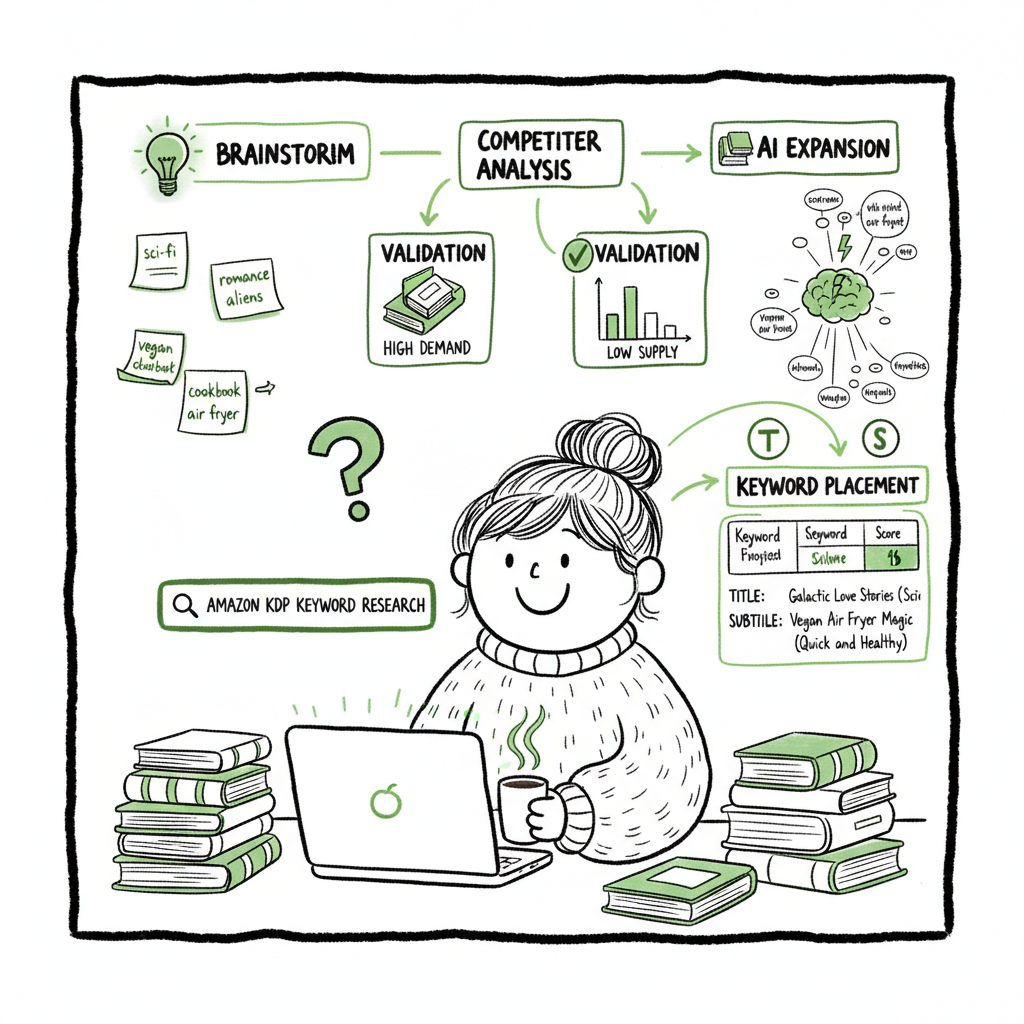
- Use a repeatable 5-step process: brainstorm, analyze competitors, validate with free tools, expand with AI, and slot keywords into title, subtitle, and the seven backend boxes.
- Automating uploads and distribution across platforms makes keyword testing faster; once you publish seriously, automation is the obvious upgrade.
Table of Contents
- Why amazon kdp keyword research matters
- A practical 5-step process
- Slotting keywords: where to put what
- FAQ
Why amazon kdp keyword research matters
Most readers find books on Amazon by searching. That search drives roughly 70% of sales for many categories, so your keyword choices decide whether a book gets seen at all. Amazon KDP keyword research isn’t about tricking Amazon — it’s about matching reader language and buying intent.
Think of keywords as routing. The title and subtitle route eyeballs from searches. Backend keywords catch the variations and niche searches you can’t fit into visible text. When you do this well, a small change in keywords often produces large changes in Best Seller Rank (BSR) and steady sales.
If you plan to scale beyond a single title, consider tools that let you automate uploads and distribution. For authors moving from one-off releases to dozens of books, the next step is a model that saves time and reduces errors — for many teams that step is using a platform like Self Publish Book Amazon KDP to manage uploads and keep metadata consistent across channels.
A practical 5-step process
This is an operator-friendly workflow you can repeat every release or quarterly when you re-run keyword tests.
Step 1 — Seed and brainstorm
Start with the obvious: genre, subgenre, audience, tropes, and read-alike titles. Write down everything a reader might type — include longer phrases like “slow-burn enemies-to-lovers romance” or “low content gratitude journal for moms.” These seed phrases are the base for every other step.
Step 2 — Quick competitor scan
Open the top 10 search results for your seed phrases. Note:
– Repeating words in titles/subtitles
– Categories they use
– Common reader complaints in reviews (these become angle keywords)
This manual scan gives context Amazon’s algorithm uses.
Step 3 — Free validation
Use Amazon autocomplete (in incognito) to check real query patterns, and look at result counts for a rough competition score. Aim for phrases with moderate volume and lower competition — result counts between ~1,000 and 10,000 are often sweet spots for niche nonfiction and many fiction subgenres. Remember Amazon indexes phrase variations, so target natural phrases, not single words.
Step 4 — Expand with AI (optional but fast)
AI tools can generate hundreds of long-tail variations and surface semantic keywords you’d miss manually. Use those suggestions but verify they match your book’s content and Amazon’s guidelines. AI saves time but needs human filtering for accuracy and compliance.
Step 5 — Prioritize and test
Choose a mix of 10–20 high-relevance long-tail phrases. Put the best ones into visible metadata (title, subtitle, description) and the rest into the seven backend keyword boxes. Track BSR and search visibility over 4–12 weeks, then rotate in new phrases and repeat.
Operational tips
– Favor intent: phrases that include “how to,” “best,” or a specific problem convert better for nonfiction.
– Use 3–5 word phrases for higher conversion — they tend to match buyer queries more exactly.
– Avoid keyword stuffing; Amazon expects accurate descriptions and penalizes misleading metadata.
Practical publishing note: when you prepare formats (ebook, paperback), remember that different platforms accept different files. If you need quick cover mockups or conversion to EPUB, tools exist to speed those steps; for example, a book cover generator can speed up production, and an EPUB converter helps you prepare files for Apple Books and other stores. If you produce multiple formats regularly, a book creation service can centralize assets and speed distribution.
Slotting keywords: where to put what
You have limited real estate. Use it where it matters.
Title and subtitle
These are the highest-impact spots. A descriptive title with a keyword phrase and a subtitle that clarifies benefit or hook is ideal. For fiction, place a strong genre term or trope in the subtitle if it doesn’t read forced.
Description
Write a readable, sales-focused description. Keywords here help indexing but never sacrifice clarity for a keyword list. Use natural language and include a few of your prioritized phrases — sprinkled, not stuffed.
The seven KDP backend boxes
Amazon gives seven keyword boxes of 50 characters each. Use them for additional long-tail phrases and semantic variations you can’t fit elsewhere. Best practices:
– Use multi-word phrases that cover variations (e.g., “meditation journal for beginners”).
– Don’t repeat exact phrases already in title/subtitle — use related search phrases.
– Use spaces and commas thoughtfully; Amazon treats spaces and punctuation in specific ways, so think in phrases, not single terms.
Practical example
If you write a journaling prompt book for new moms, your visible fields might include “Postpartum Journal: 90-Day Prompts for New Moms” and backend phrases like “postpartum gratitude prompts,” “new mom mental health journal,” and “journaling prompts for tired moms.”
Cross-format and multi-platform considerations
Keywords that work on Amazon often help discovery on other platforms, but category systems and indexing differ. If you plan to distribute widely (Kobo, Apple Books, Draft2Digital, Ingram), keep a master keyword list and adapt copies per platform.
If you’re creating the ebook or paperback files yourself, use streamlined workflows that reduce manual uploads. Converting a manuscript to EPUB is a distinct step for many platforms; using a trusted EPUB converter will cut time and errors. When you need a cover or are producing multiple versions, a fast book cover generator is a practical part of the production line. If you produce multiple formats regularly, a book creation service can centralize assets and speed distribution.
FAQ
Q: How many keywords should I target for one book?
A: Prioritize a focused set: a few high-relevance phrases in title/subtitle/description and up to seven distinct backend boxes. Think quality over quantity. You can test new phrases quarterly.
Q: Should I use singular or plural forms?
A: Amazon indexes variations. Use natural phrases your reader would type. Backend boxes can include plural and alternate forms if space allows, but prioritize unique phrases.
Q: How long before I see results?
A: Expect to test for 4–12 weeks. Changes sometimes affect search position quickly, but sustained sales require discovery and conversions. Track BSR and clicks, then adjust.
Q: Can I change keywords after publishing?
A: Yes. Update metadata and backend keywords anytime to test new phrases. Track the impact and keep a changelog.
Q: Will automation hurt my metadata quality?
A: Not if you use automation to consistently apply vetted metadata. Automation reduces human error and speeds deployment so you can iterate keywords faster.
Final thoughts
Good amazon kdp keyword research is repeatable, measurable work. Treat keywords as experiments: pick targeted long-tail phrases, slot them where they matter, and track performance. As you publish more titles, the operational burden grows — moving to automated multi-platform workflows becomes the obvious upgrade. Tools that handle CSV batch uploads, platform-specific intelligence, and consistent metadata across Amazon, Kobo, Apple Books, Draft2Digital, and Ingram deliver large time savings and fewer mistakes.
If you create covers, convert manuscripts to EPUB, or produce both paperback and ebook formats frequently, integrate the right tools into the workflow: a fast book cover generator speeds design iterations, an EPUB converter simplifies ebook delivery, and centralized book creation services keep assets organized. These steps make wide distribution practical and repeatable.
Final thoughts
Automate the upload. Own the distribution.
Visit BookUploadPro.com to try the free trial.
Sources
- KDP Keyword Research: The Complete Guide for 2025 – BookBloom
- Amazon Keyword Research: Complete Guide for 2025 – Sellerhook
- How to Choose Keywords for Your Amazon KDP Book – Reedsy
- How to Fill in Your 7 KDP Keyword Boxes: Secret Tactic (2025) – Kindlepreneur
- Make Your Book More Discoverable with Keywords – Amazon KDP Help
amazon kdp keyword research: A practical guide for self-publishers Estimated reading time: 6 minutes Key takeaways Amazon KDP keyword research is about relevance and intent: long-tail phrases (3–5 words) convert better than single words. Use a repeatable 5-step process: brainstorm, analyze competitors, validate with free tools, expand with AI, and slot keywords into title, subtitle,…