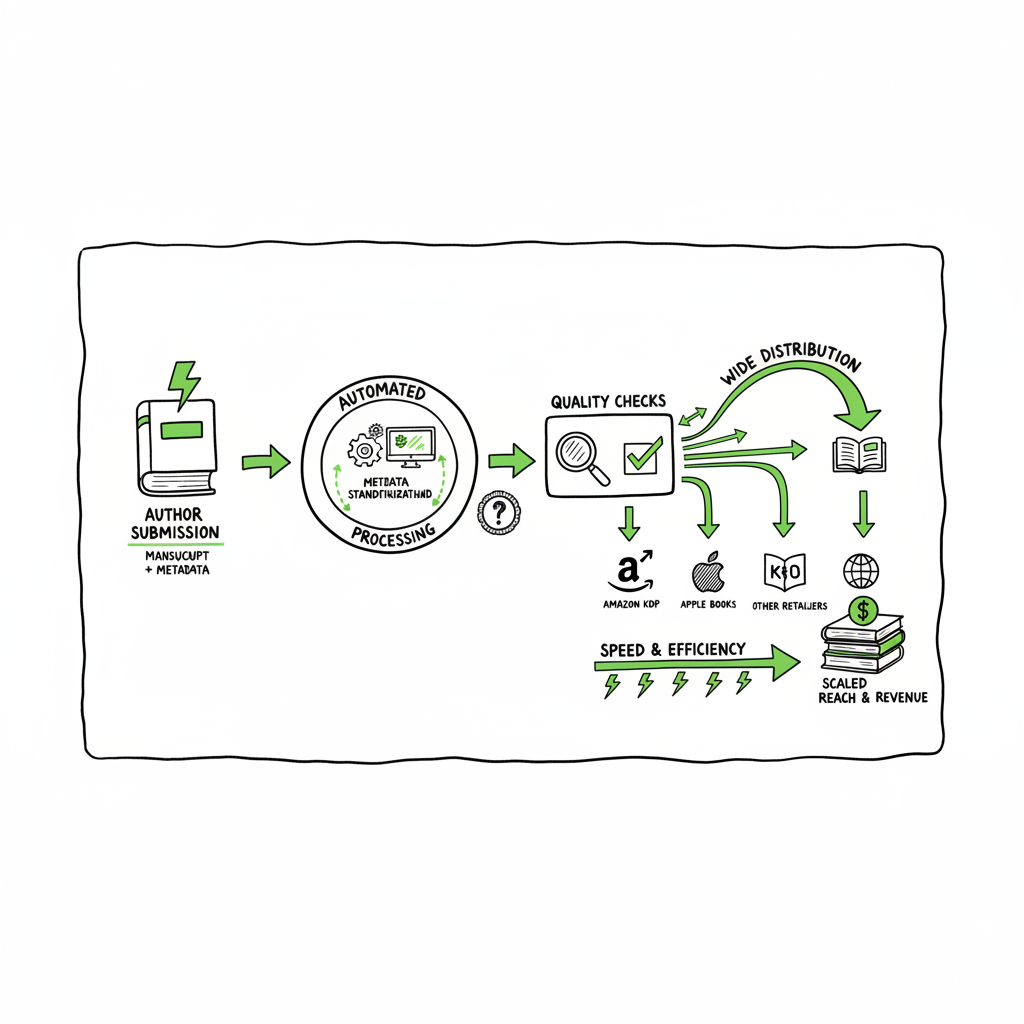
Wide Publishing Workflow for Scaling Go-Wide Distribution
Wide publishing process: how to scale go-wide book distribution
Estimated reading time: 16 minutes
Key takeaways
Key takeaways
- A clear wide publishing process turns scattered uploads into repeatable, low-error operations.
- Standardize files and metadata, automate repetitive uploads, and centralize checks to publish faster across retailers.
- BookUploadPro makes wide distribution practical: CSV batch uploads, platform-specific intelligence, and near 90% time savings for serious authors.
Table of Contents
- Overview — what wide publishing process means
- Plan and prepare: roles, assets, and metadata
- Production: formatting, covers, and retailer files
- Distribution and operations at scale
- Final thoughts
- FAQ
- Sources
Overview — what wide publishing process means
A wide publishing process is the step-by-step system you use to take a book from draft to stores beyond Amazon’s exclusive ecosystem. That includes planning, editing, design, file preparation, metadata, and the final uploads to multiple retailers. When you manage this as a process, each stage has clear inputs, outputs, and owners. You avoid the typical mistakes: wrong file formats, missing ISBNs, inconsistent metadata, or repeated manual uploads.
Going wide is different from publishing to a single store. You must satisfy small differences across platforms: file types, cover trim sizes, metadata fields, and delivery methods. A repeatable approach reduces rework and lets you scale series or backlist conversions without burning time.
Start with the objective: get your books into stores beyond one marketplace, consistently and with minimal friction. The steps are straightforward, but the hard part is doing them the same way every time so you can publish more titles without more mistakes.
Plan and prepare: roles, assets, and metadata
A reliable wide publishing process starts before you touch a bookstore dashboard. Planning fixes the common causes of delay.
Define roles and handoffs
Define roles and handoffs
- Author / content owner: final manuscript and approvals.
- Editor: structural, copy, and proof edits.
- Designer: cover and interior layout.
- Upload operator: prepares retailer files and runs the uploads.
- QA: final checks on each retailer listing.
Assigning these roles prevents “I thought someone else did it” moments. Even if you are a solo author, write down which hat you wear at each phase and use a checklist.
Create a master asset folder
Keep one folder per title with:
- Final manuscript (DOCX and a clean copy for conversion)
- Interior PDF for print-ready files
- Ebook files (EPUB or source for conversion)
- Retailer-ready cover files (square and print-ready)
- Metadata sheet (title, subtitle, author name, description, keywords, BISAC, language, ISBNs, territories, pricing)
- Social copy and launch dates
Use a simple CSV or spreadsheet for metadata. That CSV becomes the single source of truth when you upload to many stores and when you automate batch uploads.
Map wide publishing process steps
A practical map helps you spot friction. Typical stages:
- Planning and metadata collection
- Draft finalization and editing
- Design and interior formatting
- File conversion and proofing
- Retailer preparation and upload
- Post-publish monitoring and fixes
Having these steps in a documented sequence stops the cycle of “I finished the cover, but the file isn’t the right trim” or “I uploaded but missed a keyword.” If you want a ready template to adapt, see the Publish Wide Self Publishing Process for a practical structure you can reuse across titles. This central reference keeps everyone aligned and speeds up each release.
Inventory your platform requirements
Each retailer has small differences:
- EPUB validation rules vary.
- Print trim sizes and bleed settings differ.
- Metadata fields like age range or BISAC codes may be mandatory on some retailers but optional on others.
Document the requirements you run into often so you don’t repeat testing every time.
Schedule and pacing
Plan backwards from your target publish date. Allow time for:
- Two rounds of edits
- Cover and interior design
- Proof approvals (especially print proofs)
- Platform conversion and QC (epub check, metadata validation)
Add buffer time for store-specific delays. When you manage many titles, a steady cadence matters more than racing a single release.
Production: formatting, covers, and retailer files
Production is the phase where most errors hide. Small formatting problems turn into failed uploads or ugly reader experiences. Treat this phase like manufacturing: set tolerances, inspect before shipping.
Manuscript prep and conversion
Produce a clean source manuscript: one style for headings, no weird manual page breaks, and consistent image handling. From that source, produce the files retailers want.
If you need EPUB conversion, use a reliable converter and validate the file. A bad EPUB gives readers a poor impression and can produce rejections at upload. For fast, reliable conversions, consider dedicated tools that handle common edge cases and preserve table of contents, images, and fonts. If you convert frequently, try a dedicated EPUB converter to save time and reduce rework.
Interior PDFs for print
Print requires precise dimensions. Confirm:
– Trim size and bleed are set to spec
– Fonts are embedded
– Image resolution is sufficient (usually 300 dpi)
– Margins account for gutter and spine
Order a proof for every print variant if you can. Proofing finds layout errors only a real page turn will show.
Covers: ebook vs. print
Covers are different for ebook and print. Ebook covers are usually a single flat image (no spine or bleed), while print covers must include spine and back cover with bleed. Keep the original source PSD or layered file for quick edits.
If you don’t design covers in-house, use a generator or service that produces print-ready and ebook-ready exports. A cover generator that handles print templates and exports the correct bleed and spine sizes reduces manual fixes.
Design considerations for thumbnails
Design your covers for clarity in thumbnail sizes. Most readers first see a 150×200 pixel image. Clear typography and contrast beat intricate details at those sizes.
Trigger links for common production tasks
– If you produce covers with a generator, consider tools built for book cover processing that automate print and ebook outputs.
– For EPUB conversion, use a reliable EPUB converter to reduce validation errors.
– If you build paperbacks or ebooks regularly, centralize your book creation workflow with a tool that supports both formats.
(Links above point to specialist tools and services that streamline cover processing, EPUB conversion, and multi-format book creation.)
Quality control checklist
Before any upload run a checklist:
– Title and subtitle match across files and metadata sheet
– Author name and contributors are consistent
– ISBNs assigned to correct formats
– Trim sizes and bleed correct for each print SKU
– EPUB passes validation and has working TOC
– Cover files exported to the right specs
– Pricing and territories set in your master metadata sheet
A single failed field can cause a store to block an upload. Check everything once in a central place.
Distribution and operations at scale
This is where a wide publishing process earns its keep. Once files and metadata are solid, get the distribution method right.
Standardize retailer templates
Make template rows in your metadata CSV for each retailer. Columns can include:
- Retailer name
- Format (ebook, paperback)
- ISBN
- Price
- Territory
- Special fields (e.g., Apple categories or Kobo series)
Standardized templates let you generate uploads programmatically or use batch upload features when supported. The point is to stop copying and pasting the same description into ten dashboards.
Batch uploads and platform-specific intelligence
For multi-retailer upload process, batch uploads are the efficient path. Use tools that accept a single CSV to push to multiple stores or prepare files in the exact structure each store requires. Platform-specific intelligence matters: some retailers require a short description and a long description; others favor specific category codes or keyword formats.
BookUploadPro automates these repetitive tasks across Amazon KDP, Kobo, Apple Books, Draft2Digital, and Ingram. It handles platform-specific file shapes and metadata mapping so operators don’t rewrite fields for each retailer. For authors moving from single-store publishing to serious multi-platform releases, this kind of automation is an obvious upgrade. Automate the upload. Own the distribution.
Error reduction and proofing at scale
Automating uploads without checks is risky. Build automated validation that flags mismatched ISBNs, missing metadata, or failed file conversions before any file leaves your system. A platform that runs those checks saves time and prevents common rejections.
CSV batch uploads let you push dozens of titles in a fraction of manual time. Expect close to 90% time savings once you remove the manual upload step and centralize proofs and fixes.
Scheduling and release coordination
Coordinate release times across retailers when needed. Some stores let you set precise go-live times; others publish within a window. Use your process to lock final files and metadata at a cutoff date. Treat the final 48 hours before publication as read-only for files to avoid last-minute errors.
Post-publish checks and fixes
After upload, confirm:
– The live product shows the correct cover and price
– Download the store preview of the ebook
– Order a print proof if possible
– Check territories and that no markets are accidentally blocked
Log issues into your master tracker so you can fix the root cause, not just the symptom.
Final thoughts
A wide publishing process reduces friction by turning scattered tasks into a sequence of repeatable actions. Standardize assets, validate files early, and centralize metadata. Use tools that map differences between retailers so you can push many titles without manual rework.
For authors scaling their output, the combination of batch uploads and platform-aware checks is the multiplier you need. BookUploadPro provides the practical automation and CSV-driven pipeline that makes wide distribution efficient and reliable.
Visit the FAQ for quick answers, or try a test run on one title to see where the process saves you time.
FAQ
What exactly does “going wide” mean for authors?
Going wide means distributing your book to multiple retailers beyond one primary marketplace. It typically includes Amazon KDP plus stores like Kobo, Apple Books, Ingram, and others.
How many file types do I need to prepare?
At minimum, prepare a validated EPUB for ebooks and a print-ready PDF for paperbacks. Keep the source manuscript and layered cover files for edits.
Can I reuse metadata across titles?
Yes. Use a master CSV template that you copy per title. That template becomes the single source for title, subtitle, author, descriptions, keywords, categories, ISBNs, pricing, and territories.
How do I avoid errors during batch uploads?
Validate all files beforehand, run automated checks for mismatched ISBNs or missing metadata, and use tools that map CSV fields to specific retailer requirements.
Do I need separate covers for ebook and print?
Yes. Ebook covers are single-panel images; print covers include back, spine, and bleed. Keep editable source files to export both quickly.
How long does it take to publish a title wide?
From a final manuscript to live stores, it can take as little as a week with streamlined steps, but plan for 3–8 weeks to include edits, design, proofs, and scheduling buffers.
If I use a service to upload, who is responsible if something is wrong?
Responsibility stays with the content owner to confirm files and metadata. A service can reduce errors and provide checks, but always verify live listings and proofs.
Is ISBN management important?
Yes. Assign the correct ISBN to each format (ebook, paperback, hardcover). Track which ISBN is tied to which retailer listing to avoid confusion.
Sources
- How to Build a Content Publishing Workflow
- The Essential Guide to Automating Content Publishing Workflow
- Publishing Workflow Management: 8 Steps for Easy Setup
- How to Develop an Editorial Workflow
- Hybrid workflow how-to: introduction & editorial steps
- 5 Tips For The Perfect Publishing Process
- How to Develop Efficient Editorial Workflows
- Content creation workflow guide
Wide publishing process: how to scale go-wide book distribution Estimated reading time: 16 minutes Key takeaways Key takeaways A clear wide publishing process turns scattered uploads into repeatable, low-error operations. Standardize files and metadata, automate repetitive uploads, and centralize checks to publish faster across retailers. BookUploadPro makes wide distribution practical: CSV batch uploads, platform-specific intelligence,…