KDP Author Workflow Practical Steps to Streamline Publishing
KDP author workflow: practical steps to streamline publishing across platforms
Estimated reading time: 13 minutes
Key takeaways
- A repeatable KDP author workflow reduces errors and saves time when you publish multiple titles.
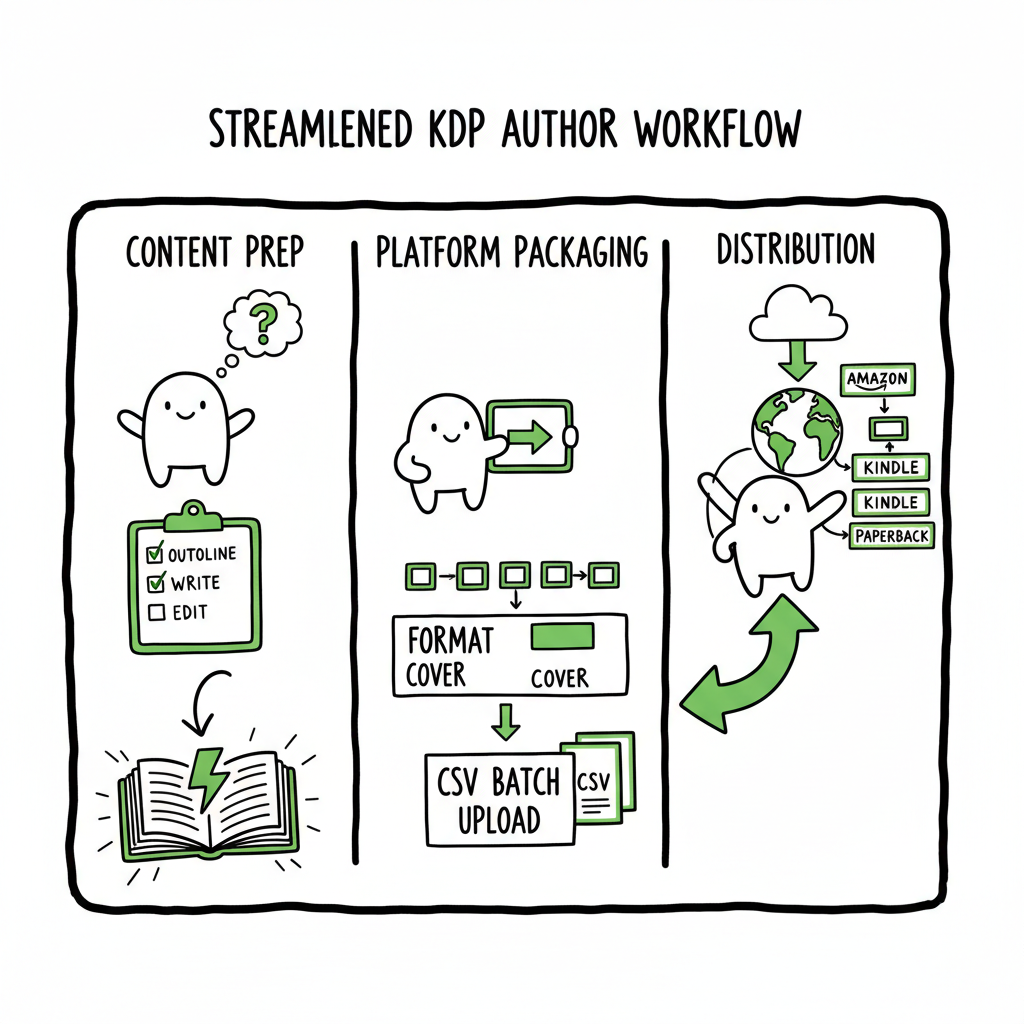
- Build a workflow that separates content prep, platform packaging, and distribution—this makes scaling predictable.
- Use CSV batch uploads and platform-aware automation to cut manual effort by roughly 80–90% as you publish more.
- Automation works best when you standardize files, metadata, and platform rules first.
Table of Contents
- Why a reliable KDP author workflow matters
- How to build an efficient KDP author workflow
- Automating KDP publishing steps at scale
- Frequently asked questions
- Sources
Why a reliable KDP author workflow matters
A clear KDP author workflow is the difference between publishing one book and running a small publishing operation. The primary idea behind a workflow is simple: turn repeated, fragile steps into routine, auditable tasks. That reduces mistakes and frees time for writing and promotion.
Right away, understand this: Amazon KDP is only one platform. Most authors who want visibility and sales treat KDP as the anchor channel. They also push to Kobo, Apple Books, Draft2Digital, and Ingram for wide distribution. A good KDP author workflow maps the common work—manuscript cleanup, cover creation, metadata, pricing, formatting—so you can reuse it across platforms.
If you want a focused starter guide to Amazon itself, see Amazon KDP for Authors for platform basics. That resource helps you understand the KDP-specific fields and constraints so your broader multi-platform workflow fits what Amazon expects.
Common friction points the workflow must solve
- Formatting surprises (fonts, margins, TOC problems) that break uploads.
- Incorrect metadata (title variants, inconsistent series data) that appear across storefronts.
- Repeated manual uploads when you publish multiple titles.
- Deliverable mismatches—print bleed, spine calculations, or incorrect EPUBs.
- Time lost because each platform demands small, different fixes.
Address these early. The fastest path to consistent publishing is documenting the exact files and metadata format you use every time. That documentation becomes the checklist your automation follows.
How to build an efficient KDP author workflow
Start by separating work into three clear stages: prepare, package, and publish. Use consistent file names and a simple folder layout so humans and scripts find the right files without hunting.
1) Prepare: manuscript, cover, and assets
- Manuscript: Finalize a single source file (Word, Google Doc, or markdown). Clean up styling, set chapters with heading styles, and remove tracked changes. Export a proof PDF early to catch layout problems.
- Cover: Design covers that meet print and ebook specs. If you use a cover generator, keep the master PSD/AI or layered file and export flattened PNG/JPEG for ebooks and high-resolution PDF for print. If you need to automate cover tasks, a Book Cover Generator Processing can speed repeated exports and sizing.
- Assets: Keep a simple folder structure: /Title/Manuscript, /Title/Cover, /Title/Assets (author photo, blurbs, back cover copy). Standardize file names like Title_Main.docx, Title_Cover.pdf, Title_ISBN.txt.
2) Package: formatting, metadata, and platform files
- Formatting: Produce platform-appropriate files: EPUB for ebooks, print-ready PDF for paperbacks, and any distributor-specific packages. Automate or script conversions where you can—manual conversion works for one book, not ten.
- Metadata: Maintain a single metadata CSV or spreadsheet for all your titles. Fields should include title, subtitle, series name, series number, author, contributors, description, keywords, categories, language, publisher, publication date, ISBN, and price tiers.
- ISBN and variants: Decide whether you will use publisher-assigned ISBNs or platform-provided identifiers (Amazon ASIN). Record the choice in your metadata so you don’t mix them up later.
If you need clean EPUBs at scale, use an EPUB Converter to ensure consistent structure and validate files before upload. Creating both ebook and paperback editions is routine once your files are standardized—consider a build step that outputs both formats from the same source.
3) Publish: platform-specific checks and distribution
- Platform rules differ. Amazon expects specific ebook and paperback dimensions, spine calculations, and KDP formatting quirks. Use a platform checklist that notes character limits, image requirements, and pricing rules for KDP and each distributor.
- Batch uploads: When your metadata CSV is accurate, many tools can map columns to platform fields. This is the point where CSV batch uploads save the most time.
- Track status: Keep a publishing tracker that records uploads, platform responses, proof approvals, and live dates. This is crucial for troubleshooting and future audits.
Practical folder structure (example)
- /Project-Name/
  - /manuscript/ (Title_Final.docx, Title_Proof.pdf)
  - /cover/ (Title_Cover.psd, Title_eBook.jpg, Title_Print.pdf)
  - /assets/ (author.jpg, backcopy.txt)
  - metadata.csv
This predictable layout makes it easy to script exports or hand off a title to a virtual assistant without reinventing the wheel.
Automating KDP publishing steps at scale
Automation doesn’t mean removing all human checks. It means shifting repeated tasks from manual clicks to predictable scripts or tools that run the same way every time. When you publish multiple books, automation turns a multi-hour manual upload into a few minutes of verification.
Where automation delivers fastest returns
- CSV batch uploads: Populate your spreadsheet once and use a platform or tool that can map those columns into platform fields. This reduces typing and ensures consistency.
- File generation: Convert your master manuscript to EPUB and print PDF automatically. Use consistent templates for covers and interior layout so exports don’t require manual resizing.
- Platform intelligence: Good automation tools include rules that understand per-platform constraints—image size limits, title length limits, or special category rules. That intelligence prevents rejections before upload.
How BookUploadPro fits a multi-platform workflow
When you move beyond a single book, manual uploads stop scaling. BookUploadPro automates repetitive uploads across Amazon KDP, Kobo, Apple Books, Draft2Digital, and Ingram. At scale, the service reduces repetitive time by roughly 80–90% because it handles the platform-specific packaging, maps your CSV metadata, and remembers rules that otherwise require repeated fixes.
Key capabilities that matter in automation
- Unified multi-platform publishing: One source of truth (your metadata and files) that the automation pushes to multiple storefronts.
- CSV batch uploads: Map spreadsheet fields once; reuse across titles to push many books with consistent metadata.
- Platform-specific intelligence: Automation that validates files and adjusts packaging to each platform reduces rework.
- Error reduction: Automated validation catches common mistakes—EPUB errors, missing metadata, image sizing—before upload.
Practical automation steps
- Standardize your master files and metadata.
- Build or export a CSV with all titles and fields matching your chosen tool.
- Run a validation pass: check EPUB, cover files, ISBNs, and metadata completeness.
- Execute a batch upload to a single automation tool that distributes to multiple platforms.
- Verify a sample of live listings to confirm everything mapped correctly.
Common pitfalls and how automation helps
- Pitfall: Mistyped metadata replicated across platforms. Automation uses one metadata source to prevent that.
- Pitfall: Platform-specific rejections after upload. Automation validates and adapts files for each platform before submission.
- Pitfall: Time lost repeating tweaks across storefronts. Automation applies the tweak once and deploys it everywhere.
When to adopt automation
Automation is an obvious upgrade once you start publishing seriously—when the number of titles or frequency of releases makes manual uploads a bottleneck. If you publish more than a couple of titles a year, the time savings and error reduction pay for the tool in short order.
File and cover tasks you will still control
Automation handles distribution, but you still need good inputs. That includes clean manuscripts, a proper cover, and accurate metadata. If you regularly generate covers, a Book Cover Generator Processing speeds the process and lets you maintain a consistent look across catalogs. If you need EPUB files converted reliably, an EPUB Converter helps produce validated ebook files that won’t be rejected.
A few words on paperbacks and print-on-demand
Paperback files require accurate trim sizes, bleed settings, and spine calculations. Automating the measurement and output saves time and prevents mismatched spines or incorrect margins. If you produce both ebook and paperback editions, include the print build step in your standard pipeline so the same source produces both outputs.
For broader toolsets, see Book Creation Tools And Services.
Quality control and manual checks
Even with automation, build a short QC checklist to run after any batch publish:
- Verify listing titles, subtitles, and series order on two storefronts.
- Open the ebook on a device or reader app to check TOC, images, and hyphenation.
- Order a proof paperback (when possible) for visual inspection once per edition or per new template.
Scaling templates and variants
If you produce multiple formats (large print, illustrated, boxed sets), build templates for each variant. Automate the selection of the right template based on metadata fields. When your automation selects the wrong template, you can fix the rule once and re-run the batch.
Pricing strategies and automation
Automation cannot decide strategy for you, but it can roll out prices quickly across retailers. Use your metadata spreadsheet to hold price tiers and royalty options and have automation apply them. This is faster and less error-prone than entering prices manually on each platform.
Team and process considerations
If you work with contractors or a small team, the workflow must be human-readable. Use naming conventions, short documentation, and a single folder structure. Automation is most effective when the whole team adheres to the same input standards.
Cost and ROI
Tools that automate multi-platform uploads vary in price, but the math is straightforward: calculate hours saved per title multiplied by your hourly value. Many teams see a rapid ROI once they publish several titles a year—automation saves tedious manual steps and reduces cost per title over time.
Frequently asked questions
Q: How does a KDP author workflow differ from general book publishing?
A KDP-focused workflow accounts for Amazon’s specific file and metadata rules (trim sizes, cover spine math, preorder handling). A general workflow is broader and includes other distributors; a good KDP workflow sits inside the broader process and ensures Amazon-specific needs are met without rework.
Q: What is a reasonable folder and file naming convention?
Keep it simple and consistent. Example: Title_YYYY_Manuscript.docx, Title_YYYY_EPUB.epub, Title_YYYY_Cover.pdf. Include edition or format tags if you produce variants, e.g., Title_YYYY_LargePrint.pdf.
Q: Can I publish to KDP and other stores at the same time?
Yes. Use a single metadata source and a distribution tool or service that maps your fields to each platform. Batch uploads and automation make simultaneous releases practical and consistent.
Q: Will automation force a single design for all platforms?
No. Good automation applies platform-specific adjustments (image resolution, metadata field caps) while using the same source files and templates. You keep control of design decisions; automation executes consistent packaging.
Q: How do I handle series metadata for multiple platforms?
Keep series name and number in your metadata CSV. Automation should map these fields to each platform’s series fields and maintain consistent ordering. If a platform lacks explicit series support, include series info in the subtitle or description as a fallback.
Q: What are the upfront costs of setting up automation?
Upfront work includes standardizing files and metadata, choosing templates, and mapping CSV fields. Tool costs vary. Expect setup time initially, but the recurring time savings per title are the real return.
Final thoughts
A practical KDP author workflow is simple to describe and powerful in execution: standardize inputs, package once, distribute everywhere. For authors moving from occasional hobby publishing to a steady release schedule, automation and batch uploads convert tedious manual work into a predictable, repeatable system. When you standardize files, use CSVs for metadata, and validate files before upload, errors drop and your publishing cadence becomes reliable.
Automate the upload. Own the distribution.
Sources
Note: The resources above are provided for further reading on platform specifics.
Link A
Sources
– Book cover generator: https://www.bookautoai.com/book-cover-generator-processing
– EPUB converter: https://www.bookautoai.com/epub-converter
– Book creation tools and services: https://www.bookautoai.com
KDP author workflow: practical steps to streamline publishing across platforms Estimated reading time: 13 minutes Key takeaways A repeatable KDP author workflow reduces errors and saves time when you publish multiple titles. Build a workflow that separates content prep, platform packaging, and distribution—this makes scaling predictable. Use CSV batch uploads and platform-aware automation to cut…