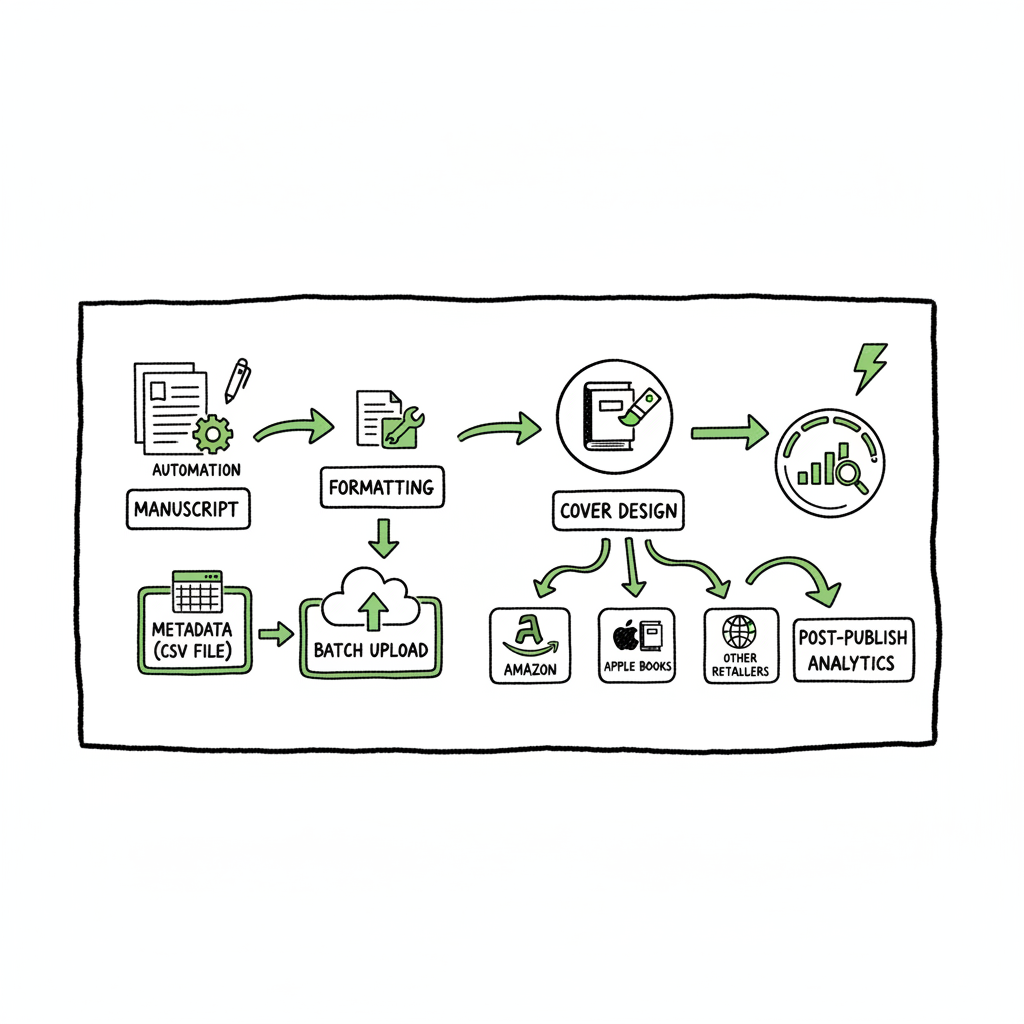
Wide Publishing Workflow Steps to Publish Across Retailers
Wide publishing workflow: A practical guide for self-publishers
Estimated reading time: 14 minutes
Key takeaways
- A repeatable wide publishing workflow reduces time, errors, and friction when you publish across multiple retailers.
- Core steps include manuscript formatting, cover and metadata preparation, platform-specific packaging, batch uploads, and post-publish monitoring.
- Automation and CSV batch uploads make wide distribution practical; BookUploadPro is built to save ~90% of manual upload time and reduce platform-specific errors.
Table of Contents
- Why a wide publishing workflow matters
- Building and automating a wide publishing workflow
- FAQ
- Sources
Why a wide publishing workflow matters
If you want your books available everywhere readers look, you need a wide publishing workflow. “Wide” means distributing to multiple retailers and channels — Amazon, Apple Books, Kobo, Draft2Digital, Ingram, and more — instead of relying on a single storefront. A clear, repeatable workflow turns that complexity into something you can scale.
Start with one clear idea: publishing across retailers is a technical process with many platform-specific steps. Metadata fields differ, cover size rules change, file types vary, and each retailer has its own UI quirks and validation checks. Without a workflow, you spend far too much time copying and correcting the same details over and over.
A practical wide publishing workflow focuses on three outcomes:
– Speed: get a book live on multiple platforms without manual re-entry.
– Accuracy: reduce typos, upload errors, and rejected files.
– Control: keep ISBNs, pricing, and rights organized so you own your distribution.
If you’re moving from a handful of titles to publishing regularly, the payoff is immediate. At scale, csv batch uploads and platform-specific intelligence are not nice-to-haves — they’re mandatory. For teams or solo authors publishing seriously, automation is an obvious upgrade. If you want a repeatable checklist that works across retailers, see our Publish Wide Self Publishing Workflow.
Building and automating a wide publishing workflow
This section walks through the practical steps every self-publisher should standardize, plus where automation fits. The phrases “wide publishing process steps,” “multi retailer upload workflow,” and “go wide operations” describe the same core activity: preparing one book for many stores predictably.
1. Start with a single source of truth
Create one master folder for each book that contains:
– The final manuscript file(s)
– Interior files for print (PDF) and ebook (EPUB/MOBI as needed)
– Final cover files (print and ebook versions)
– Metadata spreadsheet row: title, subtitle, description, keywords, categories, ISBN, pricing, territories, language, contributors, edition information
– Marketing assets: short blurbs, author bio, retailer-friendly descriptions
A single source of truth reduces mistakes. If metadata changes, update one spreadsheet row and propagate it. That spreadsheet becomes the backbone of a multi retailer upload workflow.
2. Prepare platform-ready files
Retailers accept slightly different file formats and specifications. Standardize your outputs from the start.
– Ebook files: EPUB is the universal ebook format. Convert your manuscript early and validate the file. If you need a reliable conversion tool for consistent EPUB output, consider an EPUB converter to avoid rework.
– Paperback/print files: Create a print-ready PDF with correct trim size, bleed, and spine width. Keep a verified version for each trim size you plan to use.
– Covers: Retailers require different cover dimensions and metadata. Prepare separate front-only ebook covers and full-wrap print covers. If you don’t want to design from scratch, a cover generator will speed this step.
Keeping these outputs consistent saves re-uploads and rejections. Use a checklist to confirm each file against retailer specs before upload.
3. Standardize metadata with a CSV
Store all book metadata in a CSV or spreadsheet. Columns should match the common fields used by retailers: title, subtitle, series, edition, author(s), contributors, ISBNs, description (short and long), keywords, BISAC categories, price by territory, publication date, language, DRMs, and distribution permissions.
A well-structured CSV supports a true multi retailer upload workflow. When you have 5, 10, or 50 books, you can push rows to a platform that accepts batch uploads and avoid manual entry for each retailer account.
4. Map fields to retailer differences
Every retailer formats fields a bit differently:
- Keywords: Some retailers allow many keywords; others use categories and subject codes instead. Map your master keywords into retailer-specific fields.
- Categories: Translate broad BISAC categories into the closest match each retailer accepts.
- Pricing: Establish a pricing matrix by territory and currency. Save the final values in your CSV.
- DRM and return policies: Note whether a retailer requires DRM options or has return rules that affect net royalties.
Document these mappings once and reuse them. The mappings are the brains behind a multi retailer upload workflow and reduce surprises at upload time.
5. Use batch upload and platform intelligence
Manual uploads are slow and error-prone. Use services or tools that accept CSV imports and automate the multi-retailer packaging. Automation does two things well:
- It transforms your master CSV into platform-specific packages, resizing covers and converting files as needed.
- It applies platform-specific intelligence, catching common errors before they cause a rejection.
When you automate, you’re not removing control; you’re removing repetitive work. You still review the final store listings, but the heavy lifting is done automatically.
6. Validate, test, and stage
Before pushing live, validate files and metadata. Create a staging or test upload where possible, or publish to a smaller retailer first to verify formatting and links. Validate:
– EPUB rendering on common devices and apps
– PDF interior and bleed checks for print
– Cover cropping and spine alignment
– Metadata display on store pages
7. Schedule and monitor
Publishing wide means coordinating release dates, pre-orders, and pricing across platforms. Use a calendar tied to your master CSV to schedule uploads or pre-orders. After launch, monitor:
– Sales dashboards across retailers
– Account notifications for errors or takedowns
– Reviews and reader feedback
A routine check at one day, one week, and one month after publication will catch issues early.
Automating wide publishing at scale with BookUploadPro
Scaling from a few titles to a catalog of dozens or hundreds shifts the problem from “how do I publish this book” to “how do I publish many books reliably.” BookUploadPro was built for that move.
What BookUploadPro solves
- Unified multi-platform publishing: One place to prepare and send books to Amazon KDP, Kobo, Apple Books, Draft2Digital, and Ingram.
- CSV batch uploads: Upload a spreadsheet of titles and let the system bundle each row into platform-ready packages.
- Platform-specific intelligence: Automatic checks for cover dimensions, EPUB validation, and metadata mapping reduce rejections.
- Error reduction and time savings: Clients report up to ~90% time savings on repetitive uploads, freeing authors to focus on writing and marketing.
- Affordable pricing + free trial: Designed for authors who publish seriously but don’t want sticker-shock on tooling.
How it fits into your workflow
- Prepare your master files and metadata spreadsheet as the source of truth.
- Use batch uploads to push multiple titles and variants (ebook, paperback, pre-order).
- Review platform-ready drafts before final submission to each retailer.
- Monitor results from a unified dashboard rather than logging into multiple retailer sites.
BookUploadPro is an obvious upgrade once authors publish seriously. It handles the repetitive, time-consuming parts so you can keep control without being controlled by the UI quirks of each retailer.
Practical example: a single-book launch, scaled
Imagine you have one new novel. Your manual process might take 2–3 hours per retailer and require multiple re-uploads. With a wide publishing process steps nailed down:
– You prepare the master files and a single-row CSV entry.
– The system converts the EPUB, creates cover variants, maps metadata, and packages the files.
– You approve the platform drafts and trigger batch submission.
When you do this for a dozen books, those hours become days. With CSV batch uploads and automation, that workload drops dramatically.
Tools that complement automation
– For cover generation, a cover generator speeds up creation of ebook and print covers with the correct specs.
– For EPUB creation and validation, an EPUB converter gives consistent results across releases.
– For print and ebook creation workflows, reliable book creation workflow tools reduce wasted time on failed uploads.
Integrations and best practices
– Maintain a versioning system for the master folder (date-stamped exports).
– Use unique ISBNs per format and track usage in your CSV.
– Archive each retailer proof after publication for future reference.
Final checklist before publishing
– Confirm EPUB passes validation on popular readers.
– Check print-ready PDFs for trim and bleed.
– Ensure covers meet each retailer’s pixel requirements.
– Verify metadata in the CSV — author name, series order, ISBN, pricing, and categories.
– Run a staging upload or quick live check on a smaller retailer where possible.
FAQ
Q: What exactly is “going wide”?
A: “Going wide” means distributing your book to multiple retailers and channels rather than exclusive distribution to a single retailer. It includes stores like Apple Books, Kobo, Draft2Digital, and Ingram, alongside or instead of an exclusive arrangement.
Q: How is a wide publishing workflow different from a regular publishing workflow?
A: The difference is scale and mapping. A wide workflow must handle multiple file specs, metadata mappings, pricing matrices, and retailer validation logic. A regular workflow for one store can be manual; a wide workflow needs structure and repeatability.
Q: Do I need ISBNs for every retailer?
A: ISBN requirements vary. For ebooks, many retailers do not require your own ISBN and assign their own identifiers, but if you want consistent control and use of your own ISBNs, assign unique ones per format (ebook, paperback, hardcover). Track them in your master CSV.
Q: Can I use the same cover for ebook and print?
A: No. Ebook covers are single-page images; print covers are full-wrap PDFs that include back cover and spine. Use a cover generator or design workflow to create both versions from a consistent design to avoid layout errors.
Q: Will automation remove the need to review store pages?
A: No. Automation reduces repetitive work and catches many errors, but you should always review final store listings for typos, formatting, and how descriptions and categories display.
Q: How does BookUploadPro fit into this?
A: BookUploadPro automates batch uploads, applies platform-specific checks, and reduces repetitive manual entry. It saves time, cuts errors, and makes wide distribution practical for authors who publish regularly.
Sources
Final thoughts
A wide publishing workflow turns the hassle of multi-retailer publishing into a repeatable operation. The keys are a master folder, a clean metadata CSV, validated files for each format, and automation that understands platform specifics. Combine those steps with batch uploads and platform intelligence, and you’ll cut time and errors dramatically.
If you’re ready to scale publications and make wide distribution practical, BookUploadPro automates the repetitive parts so you can keep control without manual drudgery. Visit the site to try the free trial.
Wide publishing workflow: A practical guide for self-publishers Estimated reading time: 14 minutes Key takeaways A repeatable wide publishing workflow reduces time, errors, and friction when you publish across multiple retailers. Core steps include manuscript formatting, cover and metadata preparation, platform-specific packaging, batch uploads, and post-publish monitoring. Automation and CSV batch uploads make wide distribution…