Publish Wide vs Exclusive KDP What Authors Should Know
Publish Wide vs Exclusive KDP: A Practical Guide for Self-Publishing Authors
Estimated reading time: 14 minutes
Key takeaways
- Choosing between publish wide vs exclusive KDP is a strategic decision, not a one-size answer: KDP Select offers KU page-read revenue and Amazon tools in exchange for 90-day eBook exclusivity; wide gives broader distribution, pricing control, and multiple income streams.
- Think in tests and portfolios: many authors combine both approaches across different titles and time windows to balance discoverability and diversification.
- Scale changes the math. Automation for wide publishing (batch uploads, platform-aware templates, and error checks) makes wide distribution practical; once you publish at volume, multi-platform automation is an obvious upgrade.
Table of Contents
- How KDP Select Works and What Exclusivity Means
- Wide Distribution: Advantages, Trade-offs, and Where It Wins
- Making the Choice: A Practical, Test-Driven Strategy
- Publish Wide at Scale: Tools, Workflows, and Efficiency
- FAQ
How KDP Select Works and What Exclusivity Means
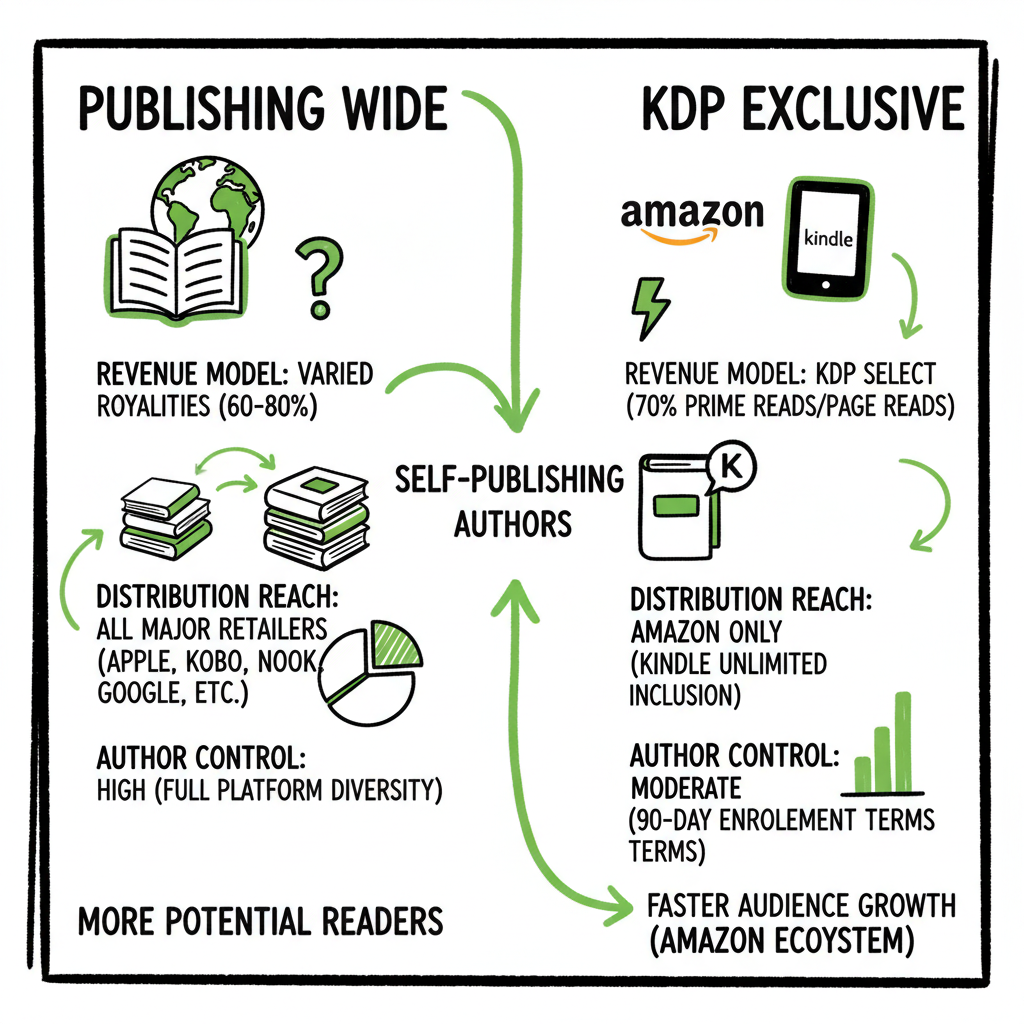
When authors weigh publish wide vs exclusive KDP they’re really asking whether to lock an eBook to Amazon for short windows to access Kindle Unlimited (KU) benefits, or to distribute broadly to Apple Books, Kobo, Barnes & Noble, libraries and more. KDP Select is Amazon’s program that requires a 90-day exclusivity commitment for the eBook in exchange for KU enrollment, page-read royalties, and promotional tools like Kindle Countdown Deals and Free Book Promotions. That exclusivity applies only to the digital file; paperbacks are not restricted.
What KDP Select delivers
- Access to Kindle Unlimited and Kindle Owners’ Lending Library payments based on pages read.
- select promotional features inside Amazon’s ecosystem that can boost discoverability on Amazon itself.
- Simpler Amazon-centric campaigns because you focus on one platform.
What exclusivity costs
- You cannot sell the same eBook on other digital stores during the 90-day period.
- Your revenue is tied partly to KU behavior and Amazon’s changing algorithms.
- You lose pricing flexibility and some marketing channels outside Amazon while enrolled.
Who typically benefits from KDP Select
- Authors in KU-friendly genres (romance, thriller, fantasy, certain types of serialized fiction).
- Authors who rely heavily on Amazon traffic and want to use KU for discoverability.
- Writers launching a new series who want concentrated exposure.
Who should be cautious
- Nonfiction authors or those with strong international audiences often find wide distribution more lucrative.
- Authors seeking library distribution, or who rely on direct sales and other retailers.
- Anyone uncomfortable with tying a revenue stream to one platform’s rules.
If you want to see a practical routine for moving titles off and onto multiple platforms, and how the operational steps differ, check a Publish Wide Self Publishing Workflow that lays out the repeatable tasks and timing for wide releases and KDP enrollment options. This kind of operational playbook is what separates a handful of releases from a scalable publishing program.
A quick note: a cover generator helps produce assets for multiple stores, and an EPUB converter helps ensure clean EPUBs for wide distribution. For broader production workflows, see the book creation workflow page. In addition, you can explore a practical example of batch publishing that ties together metadata, files, and listings.
Wide Distribution: Advantages, Trade-offs, and Where It Wins
Wide distribution means making your eBook and paperback available across multiple retailers and channels: Amazon (without Select), Apple Books, Kobo, Barnes & Noble, Draft2Digital, Ingram for print and distribution to libraries and bookstores. Wide is the opposite of exclusive: you control where the file is sold.
Clear benefits of going wide
- Multiple revenue streams. If Amazon’s KU pool fluctuates, sales on Apple, Kobo, or niche stores can stabilize income.
- International reach. Platforms like Kobo and Apple have different regional strengths; wide helps capture non-Amazon readers.
- Pricing and promotion control. You can set price and run promotions on any platform that allows them.
- Library and institutional access. Wide channels and services unlock library sales and bibliographic distribution via Ingram.
- Less dependency on a single algorithm or policy change.
Trade-offs and practical costs
- Fragmented marketing. You’ll need separate storefront pages, metadata tweaks, and marketing campaigns for different audiences.
- Extra operational work. Uploads, format checks, cover sizing, ISBN assignments, and proofing multiply across platforms.
- No KU royalties. Wide titles won’t earn page-read fees, so you’re relying on direct sales.
Wide vs KDP Select comparison — a quick view
- Discoverability: KDP Select can boost Amazon visibility quickly; wide requires a longer tail and platform-specific strategies.
- Revenue predictability: wide brings diversification; KDP Select can bring spikes from KU reads.
- Marketing complexity: KDP is simpler if your entire funnel lives on Amazon; wide needs more systems.
- Long-term control: wide preserves author control and resilience; exclusivity increases short-term push but concentrates risk.
Operational notes: what wide publishing requires
- File formats: ePub is the standard for most retailers; ensure a clean conversion from manuscript to ePub to avoid rejections. If you need a reliable tool to convert manuscripts, using an EPUB converter can remove tedious formatting steps and reduce errors.
- Covers and assets: Different retailers have thumbnail and back-cover specs; if you’re handling volumes, a cover generation pipeline that produces approved files saves hours.
- Print-ready files: For paperbacks you’ll need correctly sized PDFs with bleed and spine calculations; distribution via Ingram expands store availability.
If your business plan includes multiple titles per year, wide distribution becomes practical once you have templates, checklists, and automation. That’s where a consistent, repeatable process beats ad hoc uploads every time.
A practical note: a cover generator handles processing of multiple sizes to keep listings consistent, and an EPUB converter helps ensure clean EPUBs across retailers. See the book creation workflow for a complete setup.
Making the Choice: A Practical, Test-Driven Strategy
There’s no single “right” answer. The correct approach depends on genre, audience, and publishing goals. Here’s a pragmatic way to decide and iterate.
1. Start with data, not opinion
- Look at comparable titles in your genre. Do they get most sales through KU or through Apple and Kobo?
- Check your audience behavior: do readers comment that they prefer Kindle Unlimited or other stores?
2. Run controlled tests
- Enroll one title in KDP Select for a 90-day test. Track page-reads, KU revenue, Amazon sales rank, and listing conversions.
- For another similar title, go wide and run comparable promotion efforts on Apple, Kobo, and Amazon. Compare results after the same period.
3. Treat your backlist as a lab
- Many authors find a hybrid approach works best: enroll some frontlist titles in KDP Select to exploit KU exposure, while keeping evergreen backlist titles wide for diversified revenue.
- If a Select enrollment works well for a story or series, you can cycle titles into and out of Select based on performance and promotional plans.
4. Consider reader access and lifetime value
- KU can drive rapid series discovery. If you write long series where readers binge multiple books, KU’s page-reads can add up.
- For nonfiction or reference, readers often prefer buying across platforms; wide reaches those buyers better.
5. Factor in marketing capacity
- If you’re a solo author with limited marketing time, KDP Select simplifies outreach because you can concentrate on Amazon ads and email lists.
- If you have resources for platform-specific promotions or reliance on international markets, wide is preferable.
Exclusive KDP vs wide pros cons, in practice
- Exclusive KDP pros: fast exposure; promotional tools; simplified ad targeting.
- Exclusive KDP cons: restricted distribution; revenue reliance on KU; limits on international and library channels.
- Wide pros: diversified sales; control; global reach.
- Wide cons: more operational overhead; need for multi-platform marketing skill.
No matter which path you prefer, set measurable goals (units sold, revenue per channel, conversion rates) and a review cadence every 90 days to decide whether to stay exclusive, go wide, or cycle titles.
Publish Wide at Scale: Tools, Workflows, and Efficiency
Once you decide to publish wide with any regularity, the operational burden can grow fast. Doing five or fifty titles a year with manual uploads to each store is simply inefficient. That’s where process and tooling change the game.
What to automate and why
- Metadata and assets: reusing consistent title, subtitle, categories, keywords, and descriptions reduces errors and speeds uploads.
- File conversions and checks: clean EPUBs and print-ready PDFs lower rejection rates from retailers.
- Batch uploads: uploading multiple titles at once via CSV or API saves time and prevents mistakes.
- Platform-aware intelligence: each retailer has rules (file specs, cover sizes, metadata fields). A tool that knows those rules saves manual trial and error.
- Error reduction: automated validation prevents common problems like invalid EPUB markup, missing spine width, or incorrect trim sizes.
How a unified multi-platform publishing system changes the decision calculus
- Time savings: systems that handle CSV batch uploads and platform-specific formatting can cut upload time dramatically — sometimes by ~90% compared with manual entry.
- Practicality: wide distribution becomes manageable once you can prepare a single source of truth for a title that generates platform-ready files and listings.
- Cost-effectiveness: automated services are often affordable and pay for themselves if you publish multiple titles per year.
Operational checklist for scaling wide publishing
- Create single master records for each book (metadata, files, assets).
- Use a validated EPUB pipeline; if you convert frequently, a reliable EPUB converter can be a major time-saver.
- Generate platform-specific cover versions from a single source; if you create covers frequently, a cover generator for processing multiple sizes reduces repetitive work.
- Use batch upload tools or services to publish across Amazon KDP (non-select), Apple Books, Kobo, Draft2Digital, and Ingram at once.
- Track live listings and store statuses with automated checks so you catch delistings or formatting issues early.
Tools that fit these needs
- Conversion services that produce clean EPUBs.
- Cover processing tools that export required sizes.
- Batch upload platforms that accept CSVs and map fields to store requirements.
- Monitoring tools that alert you when a store changes rules or a listing fails.
When to bring in automation
- As soon as you publish more than a handful of titles per year, automation moves from convenience to necessity.
- If your goal is to be in multiple international stores and library channels, automation reduces cost and errors and makes wide distribution practical.
A practical example
- Prepare a single CSV for a batch of five titles with master metadata and file pointers.
- Run the EPUBs through a converter and validation tool.
- Generate cover variants automatically for Amazon, Apple, and Kobo.
- Upload to each store via a unified platform that maps your CSV fields into each retailer’s form and flags errors before submission.
- Monitor where titles go live and push updates through the same system as needed.
This end-to-end approach is exactly what publishers and high-output indie authors use. Automate the upload. Own the distribution. When the operational friction drops, the benefits of wide distribution become measurable and repeatable.
FAQ
Q: Does KDP Select only affect eBooks?
A: Yes. The 90-day exclusivity requirement for KDP Select applies to the digital edition of your book. Paperback and hardcover formats are not restricted by Select, unless Amazon’s programs change. You can use print distribution separately through KDP and Ingram for wider store reach.
Q: Can I switch between KDP Select and wide distribution?
A: Yes. You enroll a title in KDP Select for a 90-day term and can choose not to renew at the end of that period. Many authors alternate titles in and out of Select as part of their strategy. Track results and use data to decide.
Q: What genres do best in KDP Select?
A: Genres with serial readers and high engagement—romance, mystery/thriller, fantasy—often perform well in KU because readers binge multiple books and generate page reads. Nonfiction and niche markets often perform better wide.
Q: How do I handle file formats for wide distribution?
A: The standard format for most e-retailers is EPUB. For print, you’ll need properly formatted PDFs. Using a trusted EPUB converter reduces manual formatting work and improves retailer acceptance rates.
Q: Is wide distribution worth it if my Amazon sales are good?
A: If you have a successful Amazon-only strategy, test wide with one or two titles to see if additional channels add revenue without too much extra effort. For many authors, wide expands international and library sales that Amazon alone won’t capture.
Q: What are realistic time savings when I automate wide publishing?
A: Time savings vary, but authors who move from manual uploads to a batch/automation system commonly report large gains — often cutting repetitive tasks by an order of magnitude. That frees time for writing and marketing rather than form-filling.
Q: Do I need different covers for different stores?
A: Different stores have different thumbnail and back-cover size requirements, especially for print. A cover processing flow that outputs the right sizes and file types prevents rejections and keeps listings consistent.
Q: How should new authors decide where to start?
A: New authors can start with a controlled experiment: enroll one title in Select for 90 days and release another title wide. Compare performance. Use simple metrics like revenue per channel and reader acquisition cost, and iterate.
Sources
- Amazon KDP Select vs Wide: Which is Better for Authors?
- Wide vs Kindle Unlimited – Pros, Cons, and Best Distribution
- Should You Publish Your Book Wide or Go Exclusive with Amazon?
- Pros & Cons of Self-Publishing Your Book WIDE – YouTube
- Wide vs. Exclusive: A Tale of Two Marketing Systems
Publish Wide vs Exclusive KDP: A Practical Guide for Self-Publishing Authors Estimated reading time: 14 minutes Key takeaways Choosing between publish wide vs exclusive KDP is a strategic decision, not a one-size answer: KDP Select offers KU page-read revenue and Amazon tools in exchange for 90-day eBook exclusivity; wide gives broader distribution, pricing control, and…