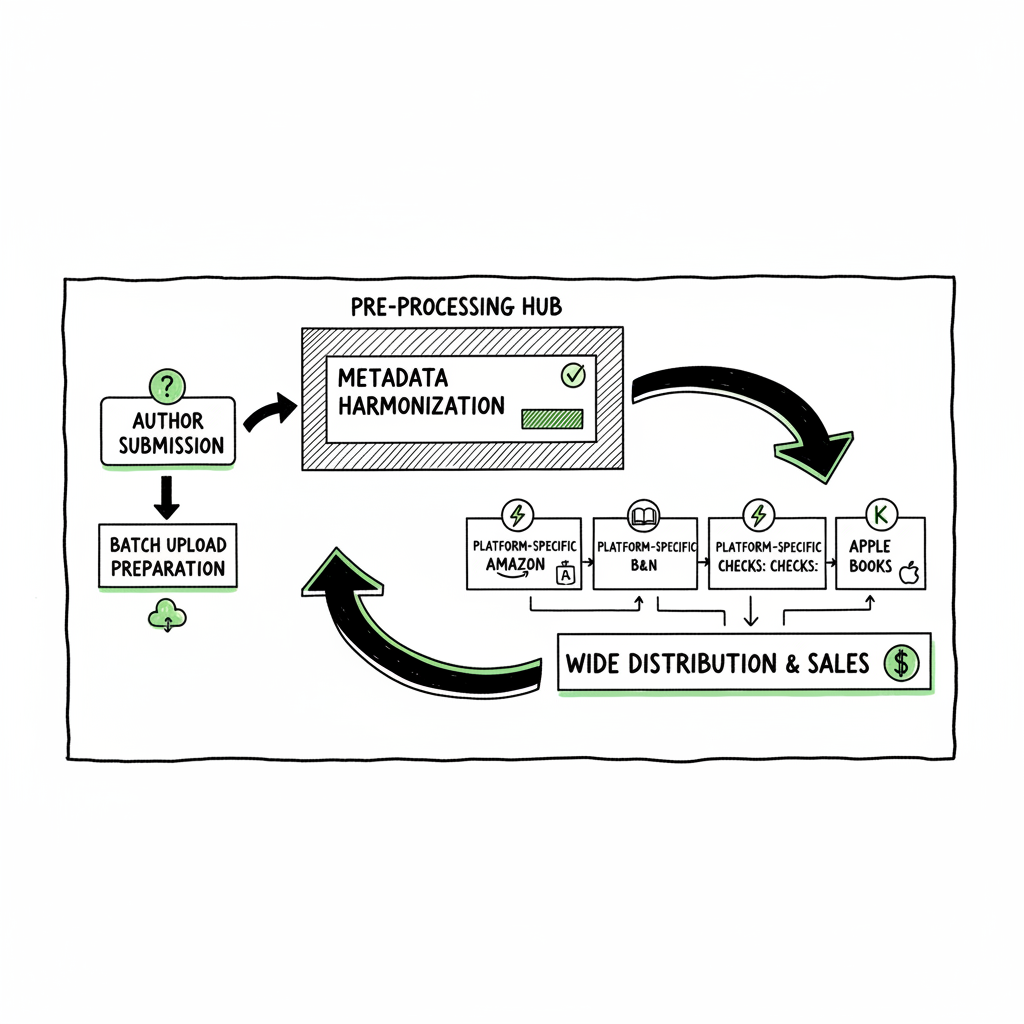
Wide Publishing Workflow and Process Steps for Authors
Wide publishing workflow: how to publish to every retailer without chaos
Estimated reading time: 12 minutes
Key takeaways
- A wide publishing workflow breaks book publishing into repeatable, owned stages so you can publish to many retailers without redoing work.
- Focus on consistent metadata, batch uploads, and platform-specific checks to cut errors and save time.
- Tools that unify multi-platform publishing and CSV batch uploads move authors from occasional publishing to reliable scale.
Table of Contents
- What a wide publishing workflow looks like
- Building the core stages and wide publishing process steps
- Frequently asked questions
- Sources
What a wide publishing workflow looks like
“Go wide” means distributing your book beyond a single retailer. A wide publishing workflow is the repeatable set of steps you run each time you release a title so that distribution stays fast, consistent, and low-risk. It covers everything from planning and writing to formatting, uploads, and post-release checks.
Think of it like a factory line for books. Each station does one job: metadata, interior file conversion, cover checks, retailer uploads, and launch monitoring. When each job is defined and owned, you reduce mistakes and speed up the whole process.
The phrase wide publishing workflow applies equally to one author handling everything or a team working together. The important parts are: clear inputs and outputs at each stage, a checklist so nothing gets missed, and a place to store the final assets and metadata so they can be reused across retailers.
Automating repetitive tasks is the main lever for scale. For example, converting a finished manuscript to EPUB and paperback-ready PDF is something you do once, then reuse. If you run dozens of titles, batching those conversions and using CSV uploads can cut time by roughly 90% compared with manual entry on each retailer portal.
If you want a concrete, ready-to-use plan, see our Publish Wide Self Publishing Workflow for an operational template you can adapt to your team or solo process. (This link walks through the same idea in a step-by-step format so you can plug it into an existing operation.)
Why a formal wide publishing workflow matters
- Consistency. The same metadata, keywords, and categories applied across retailers reduce discoverability mistakes.
- Speed. Batch uploads and CSV imports mean one pass replaces many.
- Fewer errors. Platform-specific intelligence (knowing which retailers need which file specs) avoids rejections.
- Cost control. Stop paying repeated freelancer fees for the same formatting and metadata work.
- Ownership. When you own the process, you own the distribution. That makes it practical to scale beyond a handful of titles.
Building the core stages and wide publishing process steps
A practical wide publishing workflow is a series of stages you follow every time. Below I lay out each stage and the key outputs to track. Keep language simple and exact: what file, what naming convention, which metadata field matters.
1 — Plan and scope
Why it matters: a single sheet of truth prevents scope creep and clarifies expectations.
What to do:
- Create a project file with working title, subtitle, estimated word count, genre, target audience, and launch target date.
- Decide formats: ebook? paperback? hardcover? audiobook?
- Assign owners: who writes, who edits, who formats, who uploads.
Key outputs: project sheet, timeline, owner list.
2 — Drafting and editing
Why it matters: good editing reduces returns and refunds, and improves reader satisfaction.
What to do:
- Use version control: name files like Title_v1.docx, Title_v2.docx.
- Track edits and approvals in a single place (project sheet or shared doc).
- Finalize a clean manuscript file for formatting.
Key outputs: clean manuscript file, editing sign-off.
3 — Cover design and visual checks
Why it matters: covers are judged in thumbnails. Retailers have size and spine requirements for print.
What to do:
- Create a front cover and a print-ready wrap (if doing paperback).
- Save layered source files and export web-sized images for retailer galleries.
If you need a fast option for cover production, consider using a book cover generator to produce consistent thumbnails and print wraps that match retailer specs. That makes it easier to test variations without rebuilding from scratch.
Key outputs: high-res print wrap (PDF), web-sized images (JPEG/PNG), cover source file.
4 — Formatting and file conversions
Why it matters: each retailer accepts specific file types. EPUB is standard for many ebook stores; KDP accepts EPUB and MOBI-flavored uploads; Ingram requires print-ready PDF for interior.
What to do:
- Convert your signed-off manuscript into EPUB and print-ready PDF. Validate EPUB files for common errors like missing images or incorrect TOC.
- Generate a proof copy of the print file and review pagination, margins, and fonts.
If you prefer a tool to handle conversion and validation, an EPUB converter will speed this step and reduce format rework across retailers.
Key outputs: validated EPUB, print-ready PDF, proof checklist.
5 — Metadata, description, and assets
Why it matters: metadata is how stores categorize and surface your book.
What to do:
- Draft a short and a long description.
- Prepare keywords, categories, BISAC codes, age ranges (if relevant), language, and publication date.
- Keep standardized file names: Title_Metadata_v1.csv, Title_Cover_v1.jpg.
- Keep all metadata in one CSV or spreadsheet so you can reuse it for batch uploads.
Key outputs: metadata CSV row per format, images and files named for upload.
6 — Retailer upload and platform checks
Why it matters: each platform needs a different combination of files and fields.
What to do:
- For each retailer, prepare the required fields and file formats.
- Use batch upload files (CSV) when available to speed multi-title uploads.
- For print, check proofing tools and order a proof copy when necessary.
Using a central upload tool that understands Amazon KDP, Kobo, Apple Books, Draft2Digital, and Ingram can convert your single set of metadata and assets into the right package for each store. That reduces manual entry and platform-specific errors.
7 — Pre-launch QA and scheduling
Why it matters: mistakes discovered after release are harder and costlier to fix.
What to do:
- Run a final QA checklist: metadata accuracy, price, territories, DRM settings, and pre-order dates.
- Schedule the release and set embargo timing across retailers if needed.
Key outputs: pre-launch QA pass confirmation, scheduled release calendar entry.
8 — Launch and monitoring
Why it matters: immediate post-launch checks catch delivery or indexing issues.
What to do:
- Confirm book appears in each retailer catalog and that preview pages work.
- Monitor pricing, territories, and any retail-specific errors.
- Track first-week sales and reviews to spot issues.
Key outputs: retailer live confirmations, post-launch report.
9 — Post-launch updates and promotion
Why it matters: titles often need metadata tweaks and new assets for ongoing promotion.
What to do:
- Update descriptions, try different categories, swap covers if needed.
- Re-run any retailer-specific promotions and check for formatting or display issues.
Key outputs: ongoing update log, asset change history.
Practical tips to make these stages work in real life
- Standardize file names and folder structure. Use a template so every book looks the same.
- Keep a single metadata master CSV. One row per format with consistent columns saves hours when you go to upload.
- Batch similar tasks. Do all covers, then all EPUB conversions, then all metadata checks.
- Make short checklists for each stage. They are faster than long notes.
- Use platform-specific checklists for known quirks. For example, Apple and Kobo expect certain image sizes; Ingram requires bleeds and margins by trim size.
Making multi retailer upload workflow practical
When you publish to many retailers, you need predictable inputs. The key is to create reusable outputs: one EPUB for ebook stores, one print-ready PDF for print channels, and one metadata row you can copy into each retailer’s form.
CSV batch uploads are the secret weapon. They let you update multiple titles or add new ones with a single file. That is the difference between publishing one book a month and one book a week.
When you start scaling, you’ll notice the same problems repeat: missing metadata, wrong file specs, or inconsistent descriptions. The solution is rules and validation checks. For metadata, require certain fields before upload. For files, validate EPUBs and PDFs. For covers, check thumbnail legibility.
How BookUploadPro fits this workflow
If you publish seriously, you want a tool that can take your single set of files and push them to Amazon KDP, Kobo, Apple Books, Draft2Digital, and Ingram without you typing the same form over and over. A unified multi-platform publishing system offers:
- CSV batch uploads so one spreadsheet becomes many retailer submissions.
- Platform-specific intelligence that formats your files for each store and highlights errors before upload.
- Error reduction through validation and standard naming conventions.
- Time savings—around 90% compared to manual uploads if you run multiple titles.
- Affordable pricing and a free trial so you can test it on a single release.
Automate the upload. Own the distribution. When you move from manual uploads to a platform that understands each retailer’s fields and file needs, publishing becomes predictable and repeatable—an obvious upgrade once authors start publishing seriously.
Common bottlenecks and how to fix them
- Problem: inconsistent metadata across retailers.
Fix: maintain a single metadata CSV and enforce required fields before upload. - Problem: rejected files due to specs.
Fix: build a validation step for EPUB and print files and keep a preflight checklist. - Problem: slow manual entry.
Fix: use batch CSV uploads and a tool that maps your spreadsheet to retailer forms. - Problem: cover looks bad as a thumbnail.
Fix: test thumbnails early and keep a short, high-contrast title on the front cover. - Problem: team confusion over who owns what.
Fix: simple owner list on the project sheet. One sentence: “Owner for uploads: name.”
Creating and delivering book files without headaches
You will need:
- A cover in web and print formats (front image, and wrap for print).
- A validated EPUB for ebook stores.
- A print-ready PDF for paperback or hardcover.
- Metadata in a repeatable CSV format.
If you do cover work in-house or through partners, a modern book cover generator can speed mockups and give you consistent thumbnail images to test. Keep your print wrap files archived with your project, and save the cover source file so you can tweak text for A/B testing.
For file conversions, an EPUB converter that validates the final file will remove a lot of manual checking. That saves time and avoids the typical EPUB errors that lead to a failed upload or poor reading experience.
And if you create paperbacks and ebooks, make sure your printing PDF matches the trim size and bleed requirements of your chosen print channel. Many platforms will reject uploads or render poor proofs if margins or fonts fall into the safe zone. For overall book creation, book creation tools can help.
Scaling tips for go wide operations
- Treat publishing like repeatable operations, not one-off projects.
- Break work into small tasks with owners and deadlines.
- Use versioned filenames and a single source of truth folder.
- Keep a release calendar that covers every retailer’s scheduled date.
- Track changes and asset history so you can revert if a test fails.
If you work with a team, centralize edits and approvals in shared documents. Keep final asset downloads in a single folder where the uploader can find them.
A note on pricing and distribution choices
Deciding where to sell is a mix of strategy and logistics. Pricing, regional rights, and exclusivity affect discoverability. Many authors prefer to go wide to reach more readers and to maintain control over pricing across platforms. Going wide also makes promotions more flexible—some retailers run platform-specific discounts or features that you can use without losing access to other stores.
When you’re ready to scale, choose tools that reduce manual work and protect your margins. The goal is to make wide publishing practical rather than aspirational.
Wrap-up and next steps
If you are starting to publish multiple titles, the value of a wide publishing workflow is immediate. It removes repetitive data entry, reduces simple errors, and makes releases predictable. Begin by creating a single project template that covers the stages above. From there, standardize file naming, keep a master metadata CSV, and validate your files before attempting uploads.
A unified system with CSV batch uploads, platform-specific intelligence, and validation checks is the obvious next step when you outgrow manual uploads. At that point, moving to a tool that automates the upload and distribution steps becomes a cost-effective upgrade.
Final CTA — When you’re ready to stop repeating the same manual steps and publish more reliably, visit BookUploadPro.com and try the free trial. See how unified multi-platform publishing and CSV batch uploads make wide publishing possible at scale.
Frequently asked questions
Q: What is the difference between “going wide” and using KDP Select?
A: KDP Select is an Amazon program that requires exclusivity for ebooks in exchange for promotional tools. Going wide means distributing to multiple retailers at once, which increases reach but does not include those Amazon-specific benefits. A wide publishing workflow helps you manage the distribution and file requirements across stores when you choose not to be exclusive.
Q: How do I keep metadata consistent across retailers?
A: Keep a single metadata master file (CSV or spreadsheet). Use consistent column names and include fields for title, subtitle, description, keywords, categories, language, price, and territories. Use that file as your single source of truth when preparing uploads.
Q: Can I convert the same manuscript for both ebook and print?
A: Yes. You should have a finalized manuscript file that you format separately for EPUB (ebook) and a print-ready PDF. Converting the same source ensures content consistency while allowing you to meet each format’s specific requirements. If you need a tool for converting and validating EPUB files, consider using an EPUB converter to reduce errors.
Q: How do I test covers for thumbnail legibility?
A: Create a thumbnail mockup of your cover at the sizes used in storefronts. Test it at small sizes and check readability for the title and main elements. If the title is unreadable, simplify the cover design or increase contrast. Using a book cover generator can speed up the testing process and help you iterate quickly.
Q: What is CSV batch uploading and why does it matter?
A: CSV batch uploading allows you to submit multiple books or multiple records at once to a retailer or a publishing tool. Instead of filling each field in a web form, you upload a structured spreadsheet. That reduces time and human error and lets you publish more titles with less manual work.
Sources
- How to Build a Content Publishing Workflow — activepieces.com
- Publishing Workflow Management: 8 Steps for Easy Setup — automateed.com
- The Ultimate Editorial Workflow Guide — multicollab.com
- Content Approval Workflow: Steps, Tips, and Tools for Teams — smartsheet.com
- How to Develop an Editorial Workflow — eliteediting.com
Wide publishing workflow: how to publish to every retailer without chaos Estimated reading time: 12 minutes Key takeaways A wide publishing workflow breaks book publishing into repeatable, owned stages so you can publish to many retailers without redoing work. Focus on consistent metadata, batch uploads, and platform-specific checks to cut errors and save time. Tools…