Publish Wide vs Exclusive KDP A Practical Guide for Authors
Publish wide vs exclusive KDP: A practical guide for authors
Estimated reading time: 15 minutes
Key takeaways
- Choose KDP Select (exclusive KDP) if you rely on Kindle Unlimited readers and aggressive Kindle promotions; choose wide distribution if you want broader sales channels and long-term discoverability.
- The real trade-offs are audience reach, promotional tools, and workflow complexity—wide distribution raises short-term effort but scales better once automated.
- Tools that automate multi-platform uploads (CSV batch uploads, platform-specific intelligence) cut the hard part: repetitive publishing. That makes wide distribution practical for serious indie authors.
Table of Contents
- How publish wide vs exclusive KDP works
- Which option fits your goals
- Practical publishing workflows for each choice
- Financial and marketing trade-offs
- FAQ
- Sources
How publish wide vs exclusive KDP works
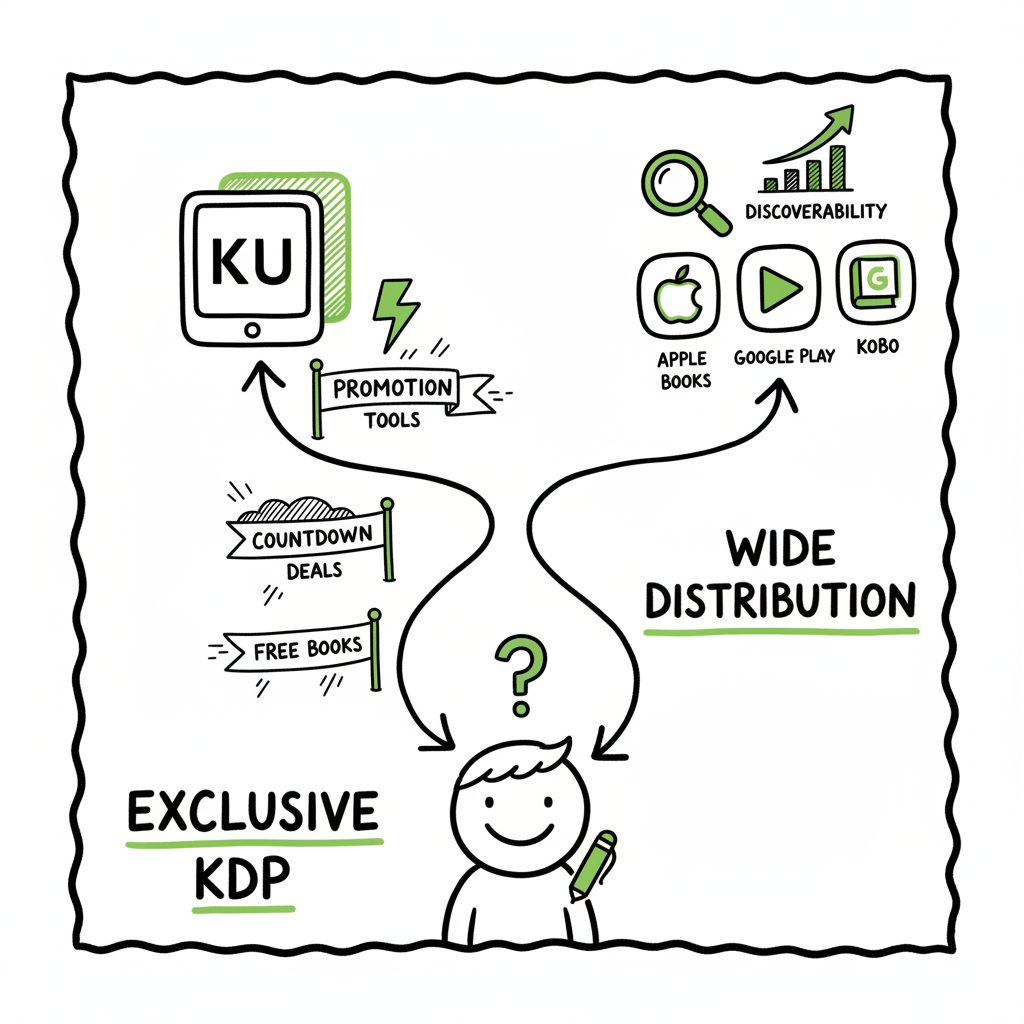
Publish wide vs exclusive KDP is the core choice many independent authors face after their first few books. KDP Select requires 90 days of Amazon exclusivity for ebooks in exchange for access to Kindle Unlimited (KU) and Select promotional tools. Wide publishing means you upload to Amazon and at least one other retailer (Kobo, Apple Books, Draft2Digital, Ingram) so your ebook is available in more stores and often in libraries and subscription services outside KU.
The decision looks simple on paper, but the right answer depends on goals and scale. If your plan is to treat a handful of titles as loss leaders to build a KU readership, KDP Select can be effective. If you aim to build a catalog, reach readers who don’t use Kindle, or sell paperbacks widely, wide distribution is usually the better long-term choice.
If you are managing multiple titles, a solid Publish Wide Self Publishing Workflow speeds everything up and reduces errors. Automating uploads across platforms and batching metadata via CSV makes wide publishing practical instead of painful. Publish Wide Self Publishing Workflow
Which option fits your goals
Build a KU reader base fast
- Best fit: Exclusive KDP (KDP Select)
- Why: Kindle Unlimited readers are concentrated on Amazon. If you run frequent free days or Kindle Countdown Deals, you can get quick reader signups and page reads.
Sell consistently across global stores and formats
- Best fit: Publish wide
- Why: Wide reaches Apple Books, Kobo, Barnes & Noble, and library aggregators. This matters for readers who prefer non-Amazon stores or who borrow from libraries.
Scale a catalog with minimal manual work
- Best fit: Publish wide with automation
- Why: After the initial setup, a publishing automation service cuts duplicate work. CSV batch uploads and platform-specific intelligence let you deploy many titles quickly.
Test price sensitivity and promotions on Amazon
- Best fit: Exclusive KDP, at least initially
- Why: KDP Select gives you promotional tools to test pricing and see direct KU effects.
Make paperbacks and wide POD distribution
- Best fit: Publish wide
- Why: POD distribution via Ingram and Apple requires non-exclusivity for some options. If you want bookstores or libraries to stock your paperback, wide distribution is the realistic route.
Practical publishing workflows for each choice
Exclusive KDP workflow (single-title focus)
- Finalize manuscript and ebook file (EPUB or MOBI-ready).
- Create a high-quality cover and test thumbnails for Kindle storefronts.
- Upload to KDP: metadata, keywords, categories, manuscript, and cover.
- Enroll in KDP Select at the ebook upload stage.
- Schedule promotional events (Countdown Deals or free days).
- Monitor KU page-reads and adjust promotions.
Notes:
- For cover generation or processing, use a reliable cover tool early in the workflow. If you need automated cover processing, there are services that handle batch cover creation and sizing to retailer specs.
- If you need a quick EPUB conversion from manuscript files, use a dedicated converter to ensure clean formatting and valid EPUB output.
Wide publishing workflow (multi-title, distributed)
- Prepare master files
- Create a single master manuscript file and one cover per format.
- Export a validated EPUB for ebook stores and a print-ready PDF for paperbacks.
- Standardize metadata in a CSV sheet
- Title, subtitle, series, contributors, BISAC categories, keywords, price, territories, ISBNs.
- Use consistent titles and series naming to keep distribution clean.
- Convert and validate files
- Convert manuscripts to retailer-ready EPUBs and validate files with vendor tools.
- Create paperback interiors and print covers to each POD vendor’s template.
- Batch upload to each platform
- Use a platform that supports CSV batch uploads and platform-specific intelligence.
- For paperbacks and wide distribution, send to KDP, Ingram, Kobo, Apple Books, and Draft2Digital or an aggregator.
- Verify storefront listings
- Check metadata and sample pages on each store after upload.
- Keep a tracking sheet with live links and sales monitoring.
- Set routine updates and royalties reconciliation
- Use monthly checks to update metadata, prices, and promotions across stores.
Why automation matters here
Manually uploading dozens of titles to multiple vendors is error-prone. A unified multi-platform publishing tool that supports CSV batch uploads and vendor-specific intelligence reduces time by roughly 90% and cuts metadata errors. That makes wide distribution not just possible, but practical for authors who publish seriously.
If you want a ready-made system that automates repetitive uploads and adapts to each retailer’s quirks, consider a process that links your master CSV to platform uploads so changes flow through automatically. Automate the upload. Own the distribution.
(Trigger links referenced in the article)
For book creation tools and related tasks, see available resources. Book creation tools can help with generating and formatting manuscripts for multiple retailers.
Financial and marketing trade-offs
Revenue channels
- KDP Select gives you income from KU page-reads and any Amazon ebook sales.
- Wide distribution adds Apple Books, Kobo, Barnes & Noble, and library systems, each with their own audience and spending patterns.
Visibility and discoverability
- Amazon offers powerful on-site discovery and ads, and enrollment in KDP Select can make some promotional levers available.
- Wide distribution multiplies places readers can discover a book. That often results in a longer tail of sales over time.
Promotions and pricing
- KDP Select lets you run limited free promotions and Countdown Deals; these can spike downloads and KU reads.
- Wide distribution means you must coordinate promotions across stores and accept that some stores have different tools. You can still run price promotions via aggregators or by briefly changing list prices.
Time and complexity
- Exclusive KDP is lighter workflow-wise if you only update one store.
- Wide is heavier up front, lighter later if automated. The point where wide becomes more efficient than exclusive is around a few titles—once you repeat uploads, the per-title work drops significantly if you batch.
A realistic example
Author A has three romance novellas and a stable monthly marketing plan. They try KDP Select for six months on the lead title and get a big KU reader base, but sales outside Amazon remain zero. After moving wide, they gain steady Apple and Kobo sales that match their KU income within a year.
Author B focuses on a multi-book series in thriller and targets Kindle readers only. The series works well in KU because readers who binge a series find KU cost-effective. For them, the Select program is a better tactical fit.
How to test without full commitment
- Start single-title exclusive for a publishing window (90 days), measure KU reads and conversion to paid sales.
- Move that title wide for another window and compare total revenue and discovery.
- Keep consistent reporting: page-reads, paid sales, and platform-specific sales.
KDP exclusivity alternatives and hybrid approaches
- Windowed exclusivity: Run KDP Select for the first 90 days to capture KU readers, then go wide upon re-release or after the initial promotional period.
- Series split: Keep the lead-in book exclusive to build audience, then publish sequels wide to reach all stores.
- Format split: Use exclusivity for ebooks but distribute paperbacks widely through Ingram and other POD channels.
This flexibility creates near-term advantages while keeping longer-term options open. Among alternatives, a common pattern is to test on a single title and then standardize the best approach for the rest of the catalog.
Practical tips for metadata, covers, and files
- Metadata: Use consistent series information and standardized keywords. Keep a master CSV.
- Covers: Create retailer-ready covers. If you need bulk processing, automated cover tools can resize and validate files quickly.
- EPUBs: Validate your EPUBs with a converter. Clean HTML and proper table-of-contents improve reader experience across devices.
- Proofing: Order proofs for paperbacks when possible and review digital proofs for all retail stores.
FAQ
Will my KU earnings disappear if I go wide?
KU earnings come only while your ebook is enrolled in KDP Select and readers access it through Kindle Unlimited. When you move a book wide, KU page-reads stop. The trade-off is potential sales from other stores.
Can I switch back and forth between exclusive and wide?
Yes. KDP’s enrollment is for 90-day periods. After a period ends, you may remove the book from Select and distribute it wide. Track results to see what brings better long-term returns.
Do paperbacks require wide distribution?
You can sell paperbacks through KDP only, but wide paperback distribution—through Ingram and other POD networks—makes retail and library placements easier. Many authors use KDP for paperback printing and Ingram for bookstore distribution.
How do I handle ISBNs across platforms?
Platforms vary. Some provide free ISBNs; others require your own. Keep an ISBN spreadsheet as part of your master CSV and note which ISBN belongs to which format and vendor.
What technical tools speed up wide publishing?
CSV batch uploads, platform-specific intelligence that adapts metadata per retailer, and automated file validation save the most time. For covers and EPUBs, use dedicated processing tools to avoid format errors.
What about a hybrid approach?
Hybrid approaches like windowed exclusivity, series splits, or format splits can balance short-term KU benefits with long-term distribution reach.
Final thoughts
Choosing between publish wide vs exclusive KDP is not a binary moral choice—it’s a strategic decision tied to goals, audience, and scale. For short-term KU-focused growth, exclusive KDP has clear tactical advantages. For long-term reach, paperback availability, and sales diversity, wide distribution is the sensible path—especially once you automate the repetitive parts.
If you publish seriously, a unified multi-platform publishing tool that supports CSV batch uploads, platform-specific intelligence, and error reduction is an obvious upgrade. It makes wide distribution practical by cutting about 90% of the manual time spent on uploads and fixes. Automate the upload. Own the distribution.
Sources and tools mentioned in this article are listed below for reference.
Sources
- https://kdp.amazon.com
- https://www.draft2digital.com
- https://authors.apple.com
- https://www.kobo.com/writinglife
Publish wide vs exclusive KDP: A practical guide for authors Estimated reading time: 15 minutes Key takeaways Choose KDP Select (exclusive KDP) if you rely on Kindle Unlimited readers and aggressive Kindle promotions; choose wide distribution if you want broader sales channels and long-term discoverability. The real trade-offs are audience reach, promotional tools, and workflow…