KDP author workflow practical steps to streamline publishing
kdp author workflow: Practical steps to streamline publishing across platforms
Estimated reading time: 14 minutes
Key takeaways
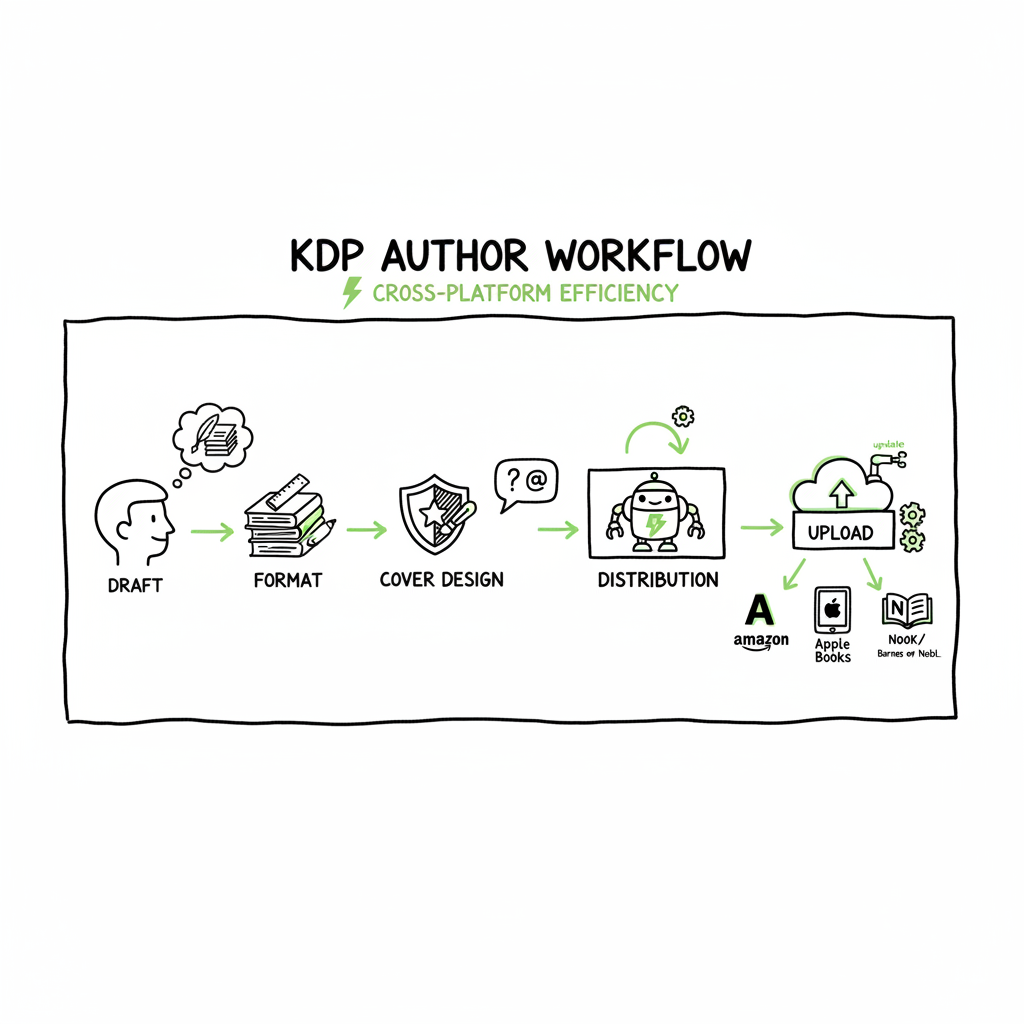
- A predictable kdp author workflow breaks publishing into repeatable stages: draft, format, cover, metadata, upload, and distribution.
- Automating uploads and platform-specific checks saves time and reduces errors—BookUploadPro handles CSV batch uploads and platform intelligence to make wide distribution practical.
- Small tooling choices (EPUB conversion, cover processing, and CSV templates) compound into large time savings as you publish more books.
Table of Contents
- KDP author workflow: Practical stages
- Scaling and automating your kdp author workflow
- Common errors and how automation fixes them
- FAQ
- Sources
KDP author workflow: Practical stages
Every author who treats publishing like a hobby will have a different process from someone publishing a series or multiple titles a year. The difference is a workflow: a repeatable set of steps that take a manuscript from first draft to live listing. A clear kdp author workflow reduces last-minute panic, avoids avoidable errors, and lets you scale output predictably.
Start by thinking in six stages. Each stage contains a small checklist that you run every time:
- Manuscript and structure
- Formatting and conversion
- Cover and assets
- Metadata and strategy
- Upload and platform checks
- Distribution and post-launch monitoring
Manuscript and structure
Write with the final format in mind. If you plan ebook + paperback, keep an eye on chapter breaks, front matter, and how images flow. For series work, standardize chapter titles and front/back matter so files can be reused. That small standardization makes later steps — formatting, metadata, and cover variants — repeatable.
Formatting and conversion
Choose a reliable final ebook format early. EPUB is the standard for most stores and gives you predictable reflow on devices. If you’re producing a paperback, prepare a print-ready PDF with correct trim sizes and bleed.
When converting, use a toolchain you trust and validate the output on multiple readers. If you need a straightforward EPUB tool for batch work, use a dedicated converter to avoid reformatting headaches; a purpose-built EPUB converter will identify common HTML/CSS problems and give you an error report before you upload. Linking a conversion tool into your workflow removes a surprise step right before publishing.
Cover and assets
Cover files must meet each retailer’s specs: pixel size, safe area, and color profile for print. Make a master cover and derive platform-specific files from it. If you generate covers at scale, use a cover processor that can apply bleed, spine text, and export multiple sizes in one pass — that removes repeated manual work and helps you keep design consistent across a series.
Metadata and strategy
Metadata is more than title and description. Think keywords, categories, BISAC codes, series fields, contributor roles, and language. Record the metadata in a single CSV or source file that becomes the single source of truth for all uploads. That way, you change a price or description in one place and republish consistently across platforms.
Upload and platform checks
This is where the work meets the marketplace. Upload content files (EPUB, PDF), cover images, and metadata. Each platform has quirks: KDP wants specific title-page arrangements for paperbacks, while other stores accept different EPUB features. Have a small checklist for each retailer and validate the store’s previewer output.
If you are new to KDP, start with resources that explain Amazon’s specific fields and linking (like how to match author name and title across formats). For authors who publish repeatedly, the page “Amazon KDP for Authors” is a practical reference on the platform’s expectations and will save time understanding KDP-only quirks.
Distribution and post-launch monitoring
Once live, check listings for correct formatting and metadata. Monitor pricing, reviews, and royalty reports. If you distribute widely, collect status updates centrally so you can react when a retailer requires a change. A single dashboard that shows live status across stores keeps you from logging into five different portals.
Practical checklist you can run every time (short version)
- Confirm manuscript final draft and chapter flow.
- Generate EPUB and print-ready PDF; validate on readers and in-page viewers.
- Produce cover master and export all required sizes.
- Populate metadata into a CSV template.
- Upload to platforms and validate previews.
- Track live status and download sales/royalty reports.
Scaling and automating your kdp author workflow
Once you publish more than one or two books a year, the manual process becomes the bottleneck. Scaling is less about writing faster and more about removing repetitive, brittle steps from the process.
Where authors waste time
- Manual uploads: filling the same fields repeatedly across five stores.
- Format rework: fixing EPUB problems found only after upload.
- Cover resizing: exporting multiple sizes and re-checking for bleed.
- Metadata drift: title typos or mismatched ISBNs across formats.
A practical automation layer fixes those by standardizing inputs and applying platform-specific transformations. That’s where tools like BookUploadPro change the math: unified multi-platform publishing, CSV batch uploads, and platform-specific intelligence reduce repetitive work and cut error rates.
How automation fits into each stage
- Manuscript -> Store-ready file: Automate EPUB conversion and validation, saving hours on hand-fixing HTML or image issues. If you need a focused converter, an EPUB converter will turn manuscript files into acceptable store files with minimal rework.
- Cover -> All sizes: Use a cover processor that accepts a master file and outputs platform-ready images for Kindle, Apple Books, and print. This reduces resizing errors and keeps designs consistent.
- Metadata -> Upload: Maintain a single CSV that maps to fields across KDP, Kobo, Apple Books, Ingram, and Draft2Digital. A mapping layer converts one master CSV into the specific fields each store expects.
- Upload -> Status: Batch uploads remove manual copy/paste. Platform intelligence flags data mismatches (ISBN vs. title, missing contributors) before an upload runs, preventing rejected submissions.
What automation won’t do
Automation doesn’t replace editorial quality, cover design judgment, or marketing strategy. It removes friction so you can focus on high-value tasks: writing, editing, and marketing.
Why the math favors automation
If one manual upload takes 45–60 minutes across five platforms, doing it ten times a year is a full week of work. With CSV batch uploads and platform-specific rules applied automatically, those same tasks can take a few hours total. For serious indie publishers, that’s ~90% time savings on repetitive steps — the kind of efficiency that turns a hobby into a business.
When BookUploadPro becomes obvious
Once you’re publishing multiple titles or multiple formats, a service that automates the upload and handles platform quirks becomes an obvious upgrade. It keeps CSV templates, runs validation rules, and pushes to Amazon, Kobo, Apple Books, Draft2Digital, and Ingram in one workflow. Automate the upload. Own the distribution.
Common errors and how automation fixes them
Error: Incorrect EPUB rendering on devices
Cause: Hidden HTML tags, inconsistent CSS, or unsupported fonts.
Fix with automation: Use a converter that validates EPUB and reports issues early. That avoids discovering rendering problems in the store previewer and reduces back-and-forth fixes.
Error: Mismatched metadata between formats (e.g., different subtitles or titles)
Cause: Manual entry per platform and no single source of truth.
Fix with automation: Keep metadata in one CSV and map fields per platform. That guarantees the title, subtitle, and contributor names match across ebook, paperback, and audio listings.
Error: Cover bleed or wrong spine dimensions for paperback
Cause: Manual resizing and inconsistent templates.
Fix with automation: Use a cover generator or processor that exports print-ready PDFs and platform-specific images; it computes spine width and applies bleeds consistently.
Error: Rejected uploads due to missing required fields
Cause: Each platform enforces different required fields; manual uploads can miss one item.
Fix with automation: Platform-specific intelligence validates required fields before upload and halts submission until the CSV entry is corrected.
Error: Price or royalty mismatches across stores
Cause: Forgetting to update prices in multiple dashboards manually.
Fix with automation: Centralize price changes in your metadata CSV and push updates to all platforms from one place.
Operational notes from publishers who scale
- Lock down a master CSV schema and never edit live platform entries without updating the CSV.
- Version your cover and interior files. Name them with timestamps or version numbers so you can always roll back.
- Keep a short validation run before each upload. The automation should stop when it finds a mismatch, not after push.
Tooling references that help
When you need a reliable EPUB conversion step in your pipeline, use a dedicated EPUB converter to catch issues early. If cover processing is a regular task, a cover generator that supports bleed and spine calculations becomes essential. For creating and exporting paperbacks and ebooks from the same project, use a book creation tool that supports both output paths so you avoid rework.
That’s where BookUploadPro changes the math. Look for CSV batch uploads and platform-specific intelligence to streamline distribution across stores.
Additionally, to support the EPUB conversion and cover processing steps, consider tools from BookAutoAI:
For EPUB conversion, the EPUB converter from BookAutoAI helps validate output across reading systems. EPUB converter
For cover processing, the cover generator/processor in BookAutoAI streamlines bleed and spine calculations. Cover processing
For publishing and creating ebooks and paperbacks from the same project, the BookAutoAI book creation tool is useful. book creation tool
To keep BookUploadPro on point with your multi-platform needs, consider the branding text BookUploadPro.
FAQ
Q: What is a kdp author workflow and why is it different from other publishing workflows?
A: A kdp author workflow is a repeatable sequence of actions tuned to publishing on Amazon KDP and other stores. The difference is knowing Amazon’s specific field requirements, previewer behavior, and how KDP links formats. A workflow that incorporates KDP specifics avoids last-minute rework for title pages, trim sizes, and format linking.
Q: How do I keep metadata consistent across platforms?
A: Store metadata in a single CSV file and map that file to each platform’s required fields. Maintain version control for the CSV and use an automated mapping layer that transforms one schema into platform-specific entries.
Q: Should I convert to EPUB myself or use a service?
A: If you publish only occasionally, manual conversion with careful checking is fine. If you publish multiple books, a dedicated EPUB converter reduces repeated fixes and catches common errors early. Use an EPUB converter that validates output on multiple reading systems.
Q: How do I handle covers for ebook and paperback?
A: Start with a master cover and export platform-specific assets. For paperback, ensure the spine width and bleed are calculated for trim size and page count. If you produce covers in volume, a cover processing tool or cover generator will save hours per title.
Q: Can automating uploads cause errors if the tool changes something unexpectedly?
A: Good automation systems expose the rules they apply and provide a validation step before a live push. Always run a validation pass and review flagged issues. Automation should reduce, not introduce, ambiguity.
Q: Is BookUploadPro suitable for small catalogs?
A: Yes. It’s helpful for anyone who wants to avoid repetitive uploads and apply consistent metadata across platforms. For small catalogs it removes the manual burden; for larger catalogs it scales the process reliably.
Q: What platforms does automation usually cover?
A: A robust multi-platform approach covers Amazon KDP, Kobo, Apple Books, Draft2Digital, and Ingram. Look for CSV batch uploads and platform-specific intelligence in the tool you pick.
Final thoughts
Automating the repetitive parts of the kdp author workflow doesn’t replace craft. It protects your time and ensures more predictable releases. Standardize your files, centralize metadata, validate before upload, and automate the routine. When you publish seriously, automation becomes the multiplier that lets you spend more time writing and less time juggling portals.
Final thoughts
The core ideas remain: standardize your files, centralize metadata, validate before upload, and push to stores with confidence. With a strategic mix of templates and automation, you can scale your publishing while preserving quality and speed.
Sources
- https://livingwriter.com/blog/how-to-publish-a-book-on-amazon-2025-kdp-guide/
- https://reedsy.com/blog/guide/kdp/how-to-publish-a-book-on-amazon/
- https://kdp.amazon.com/help/topic/G202172740
- https://kdp.amazon.com/help/topic/G200641240
kdp author workflow: Practical steps to streamline publishing across platforms Estimated reading time: 14 minutes Key takeaways A predictable kdp author workflow breaks publishing into repeatable stages: draft, format, cover, metadata, upload, and distribution. Automating uploads and platform-specific checks saves time and reduces errors—BookUploadPro handles CSV batch uploads and platform intelligence to make wide distribution…